
RxLogic’s PayRec Module is an integrated financial management solution, designed to manage the complete billing lifecycle for pharmacy benefit operations. PayRec combines the Billing Manager, Payables Manager, Receivables Manager and Invoice Manager—into a unified platform that handles claim cycle configuration, outbound pharmacy payments (payables), inbound invoice-based revenue collection (receivables) and invoice tracking, payment application, write-offs, adjustments, balance transfers, and invoice member detail. It takes the complexity out of this process—helping you save time, avoid errors, and keep both pharmacies and clients happy.
This guide gives a brief overview of the features in the PayRec module.
Billing Manager
The Billing Manager is the configuration backbone of PayRec. It provides administrators with a hierarchical view of all billing entities, and a structured interface for defining how each entity’s billing cycles operate. It is your central hub for managing the configuration of Invoicing parameters, claim cycle schedules, billing report options and formats, hierarchy fees, and billing cycle schedules independently for each billing entity.
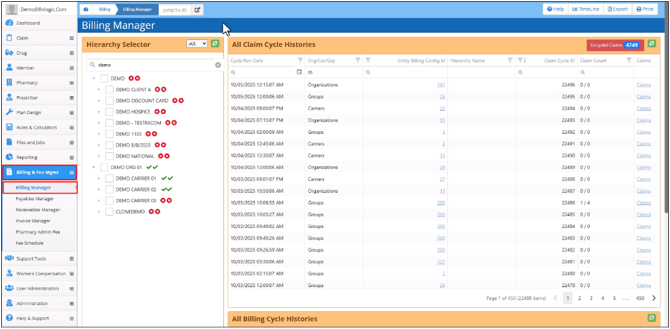
The Hierarchy Selector tree displays all billing entities (Organizations, Carriers, and Groups) based on their hierarchical structure. This allows you to define distinct billing configurations across various hierarchy levels and entities. By default, subordinate entities inherit settings from their parent level, streamlining setup, and reducing redundancy.
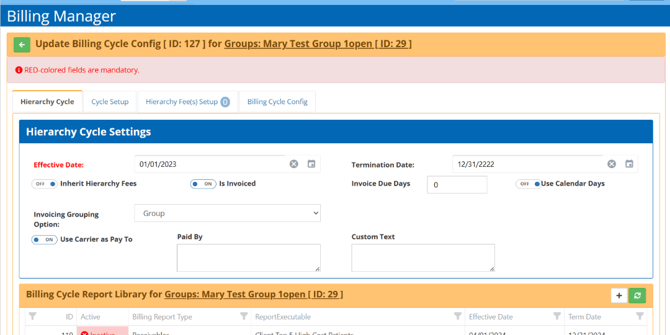
The Billing Entity Billing Cycle Config configuration screen features a four-tab panel — Hierarchy Cycle, Cycle Setup, Hierarchy Fee(s) Setup, and Billing Cycle Config — where you configure invoicing parameters, claim cycle schedules, billing report options and formats, hierarchy fees, and billing cycle schedules for the selected entity. The ability to set these options independently for each billing entity gives you more granular control and operational flexibility.
On scheduled processing dates, the billing cycle export file job aggregates all eligible claims into either a consolidated global billing cycle export file or an entity level billing cycle export file depending on the billing entities set up in the Billing Manager. The Billing Cycle Export file is loaded into PayRec and used for both outbound pharmacy payments (payables), and inbound invoice-based revenue collection (receivables).
Receivables
The Receivables Manager is the accounts receivable hub of the PayRec module, managing the full inbound billing lifecycle. This includes dynamic admin fee management, invoice and claim detail report generation based on entity-level settings in the Billing Manager, automated delivery of invoices and reports to a designated FTP site for external distribution and recording of payments received.
The Receivables Manager offers two options for invoice generation: a six-step processing wizard in the UI which requires you to download the billing cycle export file and then upload it into PayRec, or the BillingCycleExportFile job, which can automate just the loading of the Billing Cycle Export file into PayRec or load the file and automatically run some or all of the receivables processing wizard steps when a billing cycle export file is generated based on how the job is configured.
The six-step receivables processing wizard walks you through the following:
- Step 1 – Billing Cycle & Batch: Name the batch and confirm the billing cycle date range.
- Step 2 – Select Claims: Review and filter claims available for the selected billing cycle.
- Step 3 – Verify Claims: Choose options for including annual fees, monthly fees, and invoices with no claims before generating invoices.
- Step 4 – Review Invoices: Inspect all generated invoices and update invoice dates, due dates, and start and end dates if applicable at the individual invoice level.
- Step 5 – Generate Files: View batch totals (claim counts, reversals, ingredient cost, dispense fees, and invoice counts), generate invoice output files, and track job status in real time.
- Step 6 – Batch File Summary: Browse output files in a tree view and optionally copy them to a configured SFTP destination.
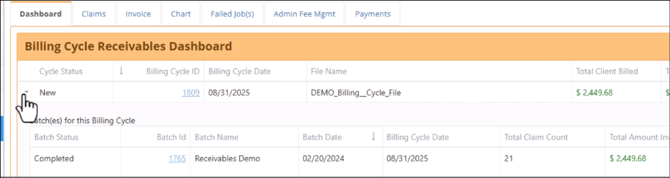
The Receivables Manager Dashboard keeps a complete library of all uploaded billing cycle files with associated receivable batches, including their details and hyperlinks to invoice and claim detail reports for easy reference.
Payables
The Payables Manager is the accounts payable hub of the PayRec module, managing the complete lifecycle of outbound pharmacy payments. This includes adjustment management; generation of a suite of payables output files — both pay-to-specific files (check summaries, claim detail summaries, and 835 files) and batch-specific files (NACHA, ACH Payments, AP Summary, Adjustments Applied, Carryovers, Combined Claims, Combined Checks, Manual Checks, and Vouchers); automated delivery of output files to a designated FTP site; payment management — including the ability to edit individual payments and manage vouchers that carry balances forward between billing cycles.
Payments can be generated for all pay to entities (pharmacies, payment centers, and carriers) for a single Billing Cycle file or across multiple billing cycle export files by using our multiple Billing Cycle file selection process.
The Payables Manager uses a six-step processing wizard for the generation of payments, and the payment output files.
The six-step payables processing wizard walks you through the following:
- Step 1 – Billing Cycle & Batch: Name the batch and confirm the billing cycle date range. (defaults to adjudication date range in uploaded file)
- Step 2 – Select Claims: Filter and include/exclude individual claims from the batch
- Step 3 – Verify Claims: Review final claim selection, toggle on Allow Negative Payments if applicable, resolve any PayTo data conflicts before generating payments
- Step 4 – Review Payments: Inspect generated payments and carryover vouchers produced by this batch. and update pay to Id, check date, payment type, demographics, check or EFT number and ACH account information if applicable at the individual payment level.
- Step 5 – Generate Files: Review batch summary statistics and generate payment output files. A real-time job status grid auto-refreshes until completion.
- Step 6 – Batch File Summary: Browse output files in a tree view and optionally copy them to a configured SFTP destination.
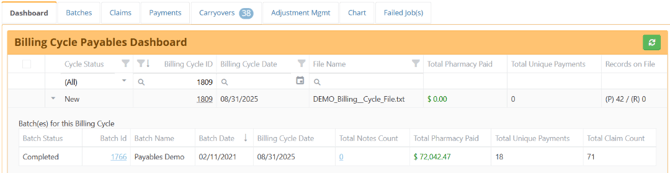
The Payables Manager Dashboard keeps a complete library of all uploaded billing cycle files with associated payable batches, including their details and hyperlinks to payable output files for easy reference.
Invoice Manager
The Invoice Manager is the PayRec module's centralized workspace for managing the full receivables lifecycle. This includes invoice tracking, payment receipt and application, write-offs, adjustments, balance transfers, invoice member detail, accounts receivable aging and rebilling of outstanding invoices.
Users have a clear view of whether clients and plan sponsors have paid claims before pharmacy payments are issued.
