
|
Update Type |
Minor |
|
Update Description |
This version update includes stabilization and performance items and various bug fixes. Added Features: • Pharmacy Network Filtering by Hours• Process Rule Copay Reduction • Invoice Payments Import Category Code Enhancements • Payables File Delivery |
|
Version Number |
1.18.0.2 |
New Development
The New Development section of the Release Notes is dedicated to work items (User Stories, Tasks, etc…) that are new functionality that was not in previous versions of the application. This section has additional information and details that the Bug Fixes section does not have. If you have additional questions on any of the new functionality, please ask your RxLogic Client Manager or check out the User Guide for the new documentation.
Claim
Paid Claim Lookup
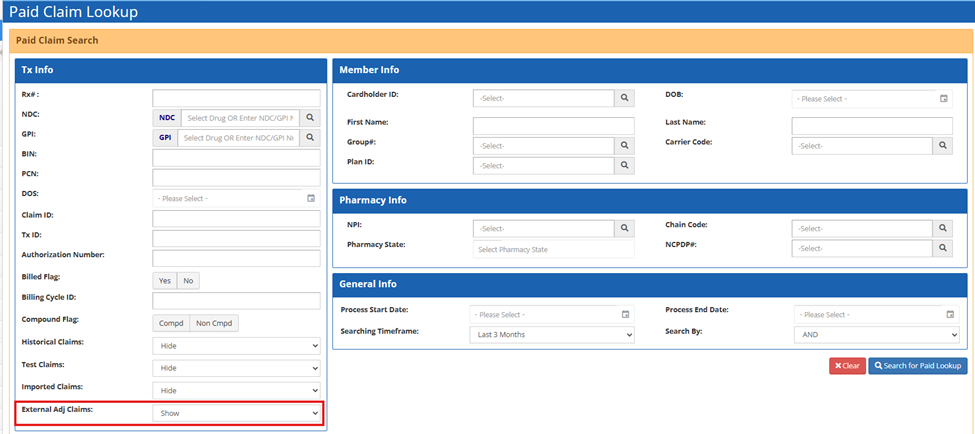
New Filter Options for External Adjudication Transactions (28032) – A new "External Adj Claims" field is available in the Tx Info section of Paid Claim Lookup, offering three dropdown choices:
- Show: includes both regular and external adjudicator claims in search results (this is the default option)
- Show Only: displays only external adjudicator claims
- Hide: excludes external adjudicator claims from results
25,000 Record Export Cap (28033) – An export limit of 25,000 records was implemented for the Paid Claim Lookup screen. If there are more than 25,000 records in the data set, the pop-up box below is shown, allowing for the 25,000 most recent transactions to still be exported.

Drug
Manual Drugs
Package UOM Now Required (28574) - The Package UOM field is now required. Failure to populate a value will display a pop-up message of “Please select a Package UOM.”.
Formulary Manager
Formulary Manager Grid Improvements (27899 / 28837) - The Formulary Manager grid was updated to better utilize space on higher resolution monitors. As a part of this change, the grid now supports continuous scrolling.
Member
MPA Manager
Grid Update to Include Brand and Generic Flat Copay (27972) – Columns for Brand Flat Copay and Generic Flat Copay are now available via the column chooser. When selected, these fields will also appear in export files.
Pharmacy
Pharmacy Manager
Filtering FTP Connections by Type = Pharmacy (27787) - The Pharmacy Manager EDI FTP Connection dialog box was updated to only display FTPs with a type of Pharmacy.
Network Manager
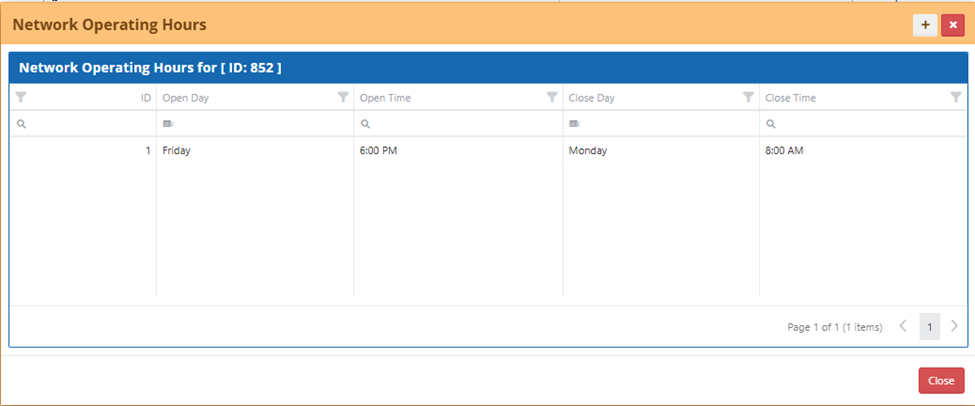
Network Filtering by Adjudication Time (22105 / 28425) – The ability to define “Network Operating Hours” was added to the Network Manager. This feature allows a Pharmacy Network to have Open and Closed hours, allowing a specific Network to be completely ignored during the Closed period. This evaluation is based on Adjudication Date/Time in Eastern time.
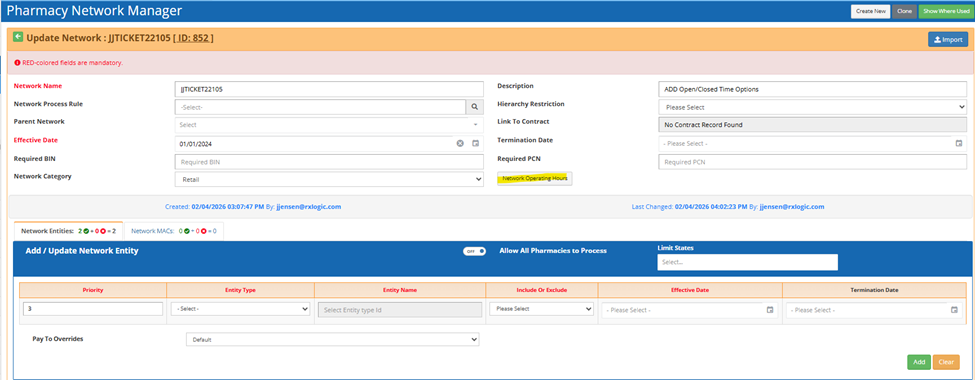
For example, the Network below could be used between the hours of Friday at 6pm, to Monday at 8am. Outside of that window, the Pharmacy Network is ignored. Defining the hours of operation is optional, and Networks without any defined hours continue to work all hours of the day.
Payment Center Manager
Filtering FTP Connections by Type = Pharmacy (27788) - The Payment Center Manager EDI FTP Connection dialog was updated to only display FTPs with a type of Pharmacy.
Plan Design
Location Manager
Location Clone Feature Now Includes Groups (27641) – The Location Code clone was enhanced to now include the related Groups as a part of the clone.
Increased Character Limit for Location Fields (28206 / 28537) – The Location Name field was expanded to support up to 100 characters, and the Description field now supports up to 128 characters. These updates were made for both UI entry, as well as Location Code import.
Rules & Calculators
Process Rules
"Reject with Code” Multiple Code Support (28211 / 28380) – The “Reject with Code” Process Rule action was enhanced to permit the selection of up to four Reject Codes.

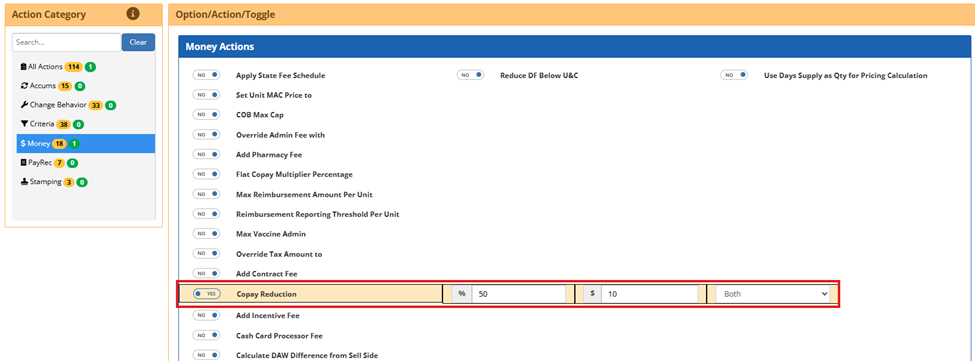
New "Copay Reduction" Option (28213/ 28420) – A new action for "Copay Reduction" was added to the Process Rule Screen. This action is located in the Money section. When set to Yes, the Copay is reduced after the total Copay is calculated. The reduction can be applied as a dollar amount, a percentage, or a combination of both. When both are used, the apply type determines how the final reduction is computed. Lesser Of applies the smaller of the two reductions, Greater Of applies the larger, and Both applies the percentage reduction first and then the dollar reduction.
Transactions with a DAW differential bypass the Copay reduction logic.
Restriction Rules
MPA Override Support for Max Script Dollars (26736) – MPA functionality was updated to allow an override of the 76 Cost Exceeds Maximum (Fill Restriction Dollar Limit Exceeded) rejection via the Max Script Dollar field on the MPA.
Files and Jobs
File Manager
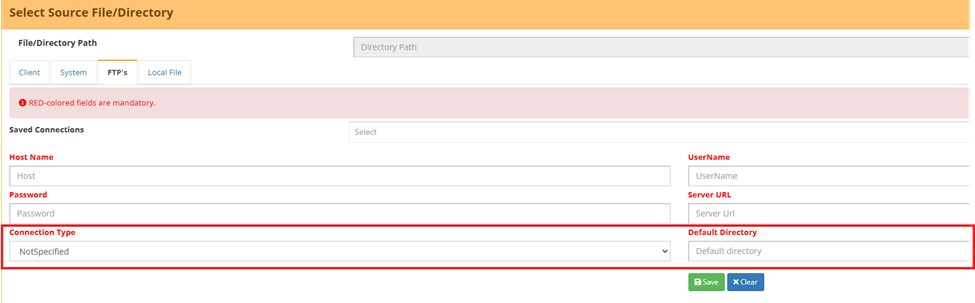
FTP Type Selector and Default Directory (27523 / 27784) – The File Manager was updated to support additional options of a new connection type selector (Client, Pharmacy, or Not Specified) for a more accurate setup. A new optional Default Directory field was also been added for use with new Payrec file delivery to Pharmacies options.
Job Manager
File Distributor – New Status and Error Message When Location Not Found (27447) – When the File Distributor attempts to move files from a location that cannot be found, the job will now be set to a status of ‘Succeeded No File’, with the run details indicating a problem with the paths used.

File Distributor Ignores Pharmacy-Type FTPs (27798) – The File Distributor configuration screen was updated so that Pharmacy type FTP connections are now excluded. Only NotSpecified and Client FTP options are available for setup on a File Distributor in this location.
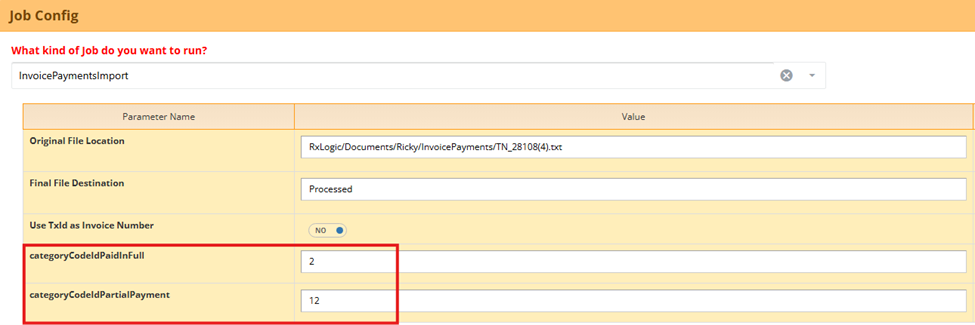
InvoicePaymentsImport Partial Payment Category Codes (28108) – The InvoicePaymentsImport job parameters were updated to support separate category codes for invoices “Paid in Full” and “Partial Payments”. The job now applies the Paid in Full category when an applied payment results in a zero or negative outstanding balance, and the new Partial Payment category code is used when the remaining balance is greater than 0.00.
Billing Cycle Export – Table to Log Output File Names and Parameters (28153) – A new table, AutomatedPayrecLogs, was added to the Payrec database to indicate files that have been auto pushed to Payrec. This table will be used in future functionality to allow for easy review of files expected to be in Payrec vs. Actual.
Billing & Fee Mgmt
Payables Manager
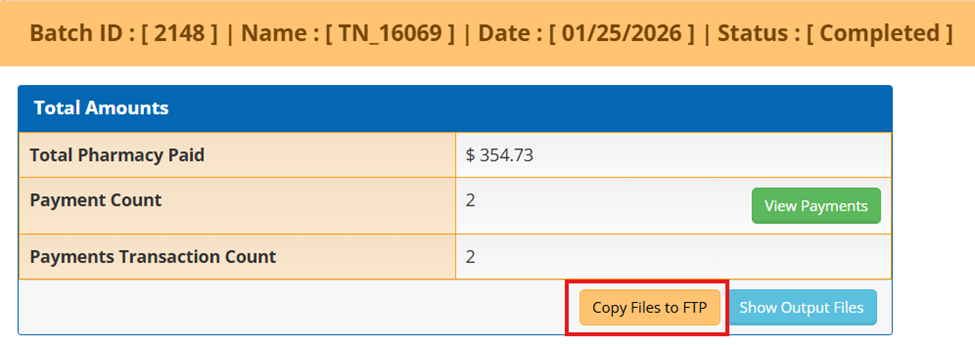
PayRec Payables/Receivables: 'Copy Files to FTP' Button on Batch ID Screen (27712 / 27759) – The Batch ID screen now includes a "Copy Files to FTP" button, allowing file copy to an FTP location from the Payables/Receivables Dashboard. This functionality was previously only available on Step 6 of the wizard process.
Make FTP Destination Path Error More Specific (28153) – An update was made to the handling of invalid destination paths when copying FTP Files. Whether in the Confirm FTP Destination Path step via Payables or Receivables Batch ID, or in Step 6 of the wizard, the error message was updated to "Invalid destination path" to provide better clarity into the cause of the error.
PayRec Payables/Receivables: Filtering FTP Connection by Type = Client (27868 / 27872) – The Payables and Receivables Managers were updated to display only non-Pharmacy FTPs for the Copy Files process, preventing the accidental use of Pharmacy‑designated FTPs.
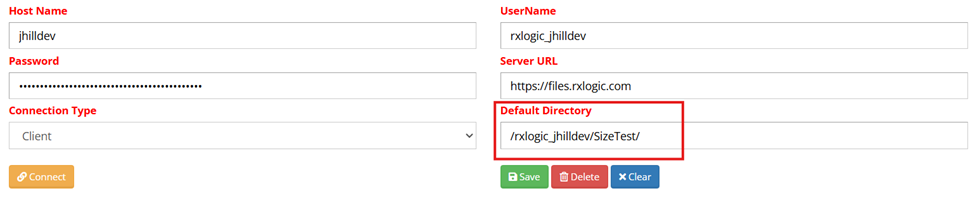
835 Delivery to Pharmacy SFTP (27524 / 27968 / 27969 / 28349 / 27885) – 835 files can now be delivered directly to Pharmacy or Payment Center SFTP connections from within the application. This utilizes the defined SFTP for the Pharmacy / Payment Center and places the files in the default directory parameter for the related FTP. The Default Directories are defined by the full path, excluding the Base URL.
The new PaymentFiles tab is only visible to users with the Custom-Control-Payables: DistributeFiles permission.
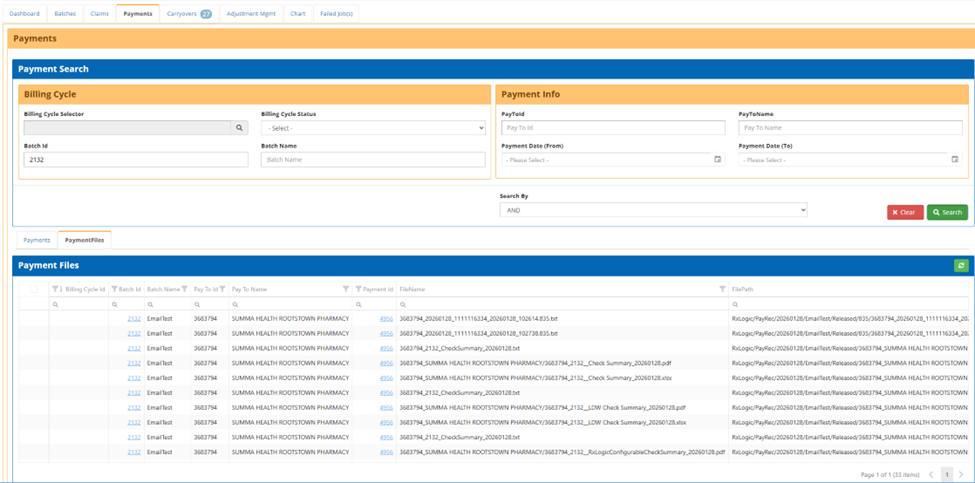
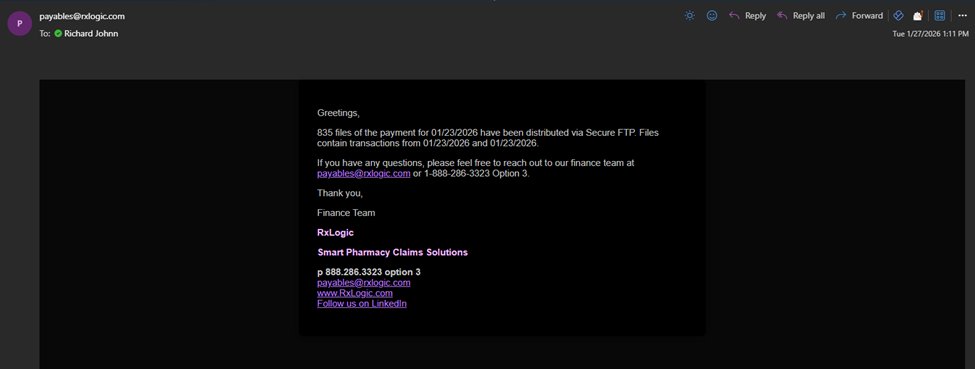
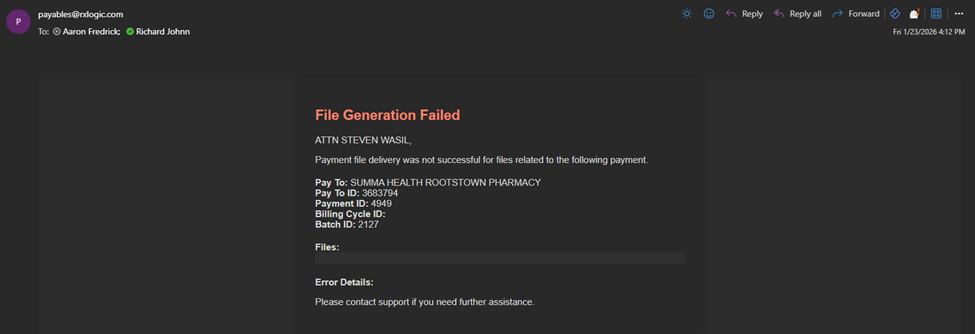
The UI displays delivery status, sent and acknowledged timestamps, and provides error messaging when the delivery fails (these failure details are logged). Successful deliveries trigger notifications to the designated “File Distribution Email” contacts on the Pharmacy and Payment Center Managers, while failed deliveries generate alerts sent to the distribution list configured in the PayRec Organization settings.

Example of a Successful 835 Delivery Email:
Example of an unsuccessful Delivery Email:
To deliver the files, select one or many of the files by checking the left most column and click on the Deliver selected files option.
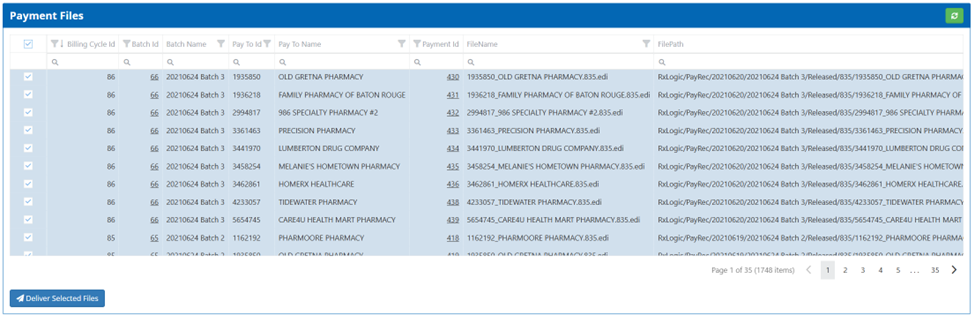
The overall steps of the process are:
- Complete a Batch.
- Navigate back to the Payables Dashboard
- Navigate to the Payments Tab
- Search for your Batch(es)
- Select the PaymentFiles Tab in the grid at the bottom of the screen
- Select the File(s) with FileTypes ending in "835"
- Click “Deliver Selected Files”
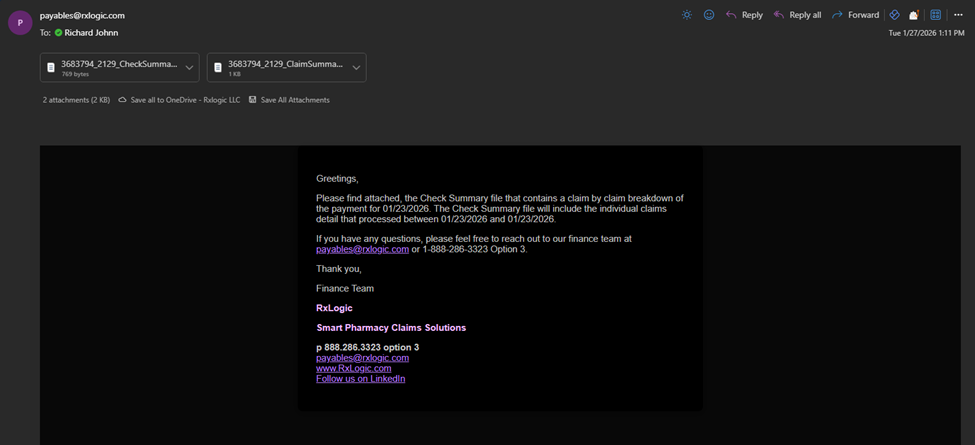
Claim Summary and Check Summary Delivery (27525) – Check Summary PDFs and Txt files can now be distributed via email. The overall process is the same as the 835 delivery detailed above, with the difference being that the related files are delivered via an Email to the File Distribution Email.
Example Email:
Condensed Claim Summary Report Changes (27013 / 27014) - The Condensed Claim Summary Report now dynamically populates the Name, Phone, Fax and Website fields based upon what is entered in the Org Info screen in PayRec. In addition, these reports are now stored in their respective Pay-To Entity directories nested within the Released directory.
NACHA File - FED TIN Immediate Origin Prefix Customization (21893) - In the Organization Info area of the Payables Manager and Receivables Manager there is a new field called “Immediate Origin Prefix”. This field allows for a single character prefix that is added to the Immediate Origin field of the NACHA file. The field defaults to ‘off’, but if used will default to a value of 1 with the option to change the value.
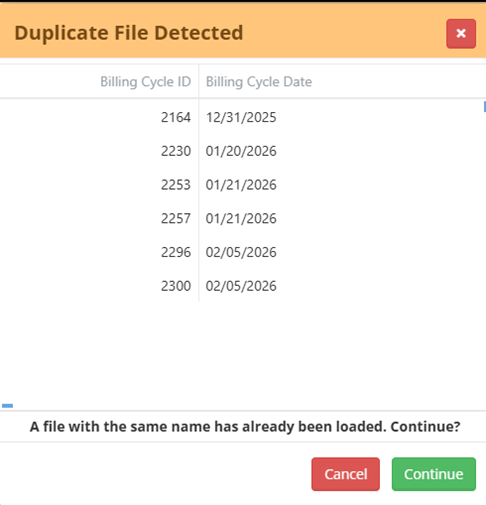
Duplicate Imported File Check (10177) – A new check was added to the Billing Cycle Import process to detect files that have already been loaded into PayRec with the same name. If a duplicate filename is found, a popup is displayed with the Billing Cycle IDs and Billing Cycle Dates of any matching files. The file can still be imported by clicking on the Continue button.
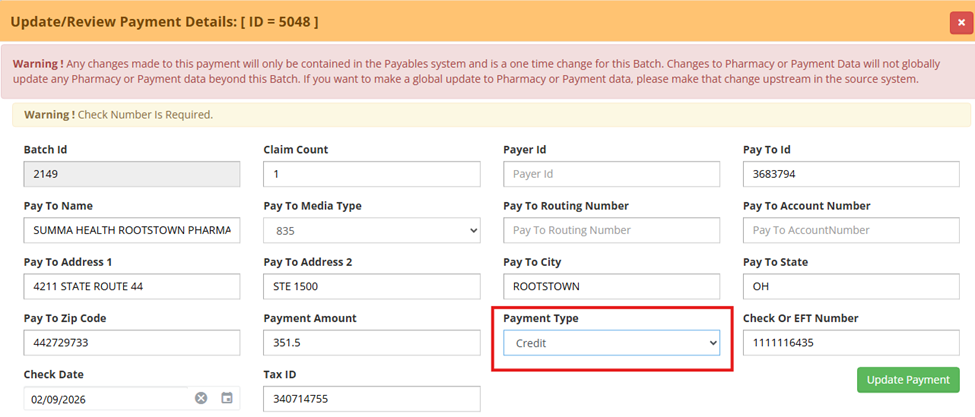
Credit Payment Type (16069 / 28637) – A new Credit option was added to the Payment Type dropdown on Step 4 of the Payables Batch process. Credit payments follow the same processing and report generation as Check but display Credit as the payment type on applicable reports such as Check Summary and AP Summary.
Payment Amount Added to Combined Claim and Claim Summary File (16731) – A new Payment Amount column was added to the Payables CombinedClaims and ClaimSummary reports. This field is calculated as Total Paid + Pharmacy Admin Fee(s) and appears as the last column in the file.
Transactions Link to Payments and Vouchers (27715) – Two new cross-reference tables, PaymentClaims and VoucherClaims, were added to the Payrec database to link Payables transactions to their associated Payments and Vouchers. Data will be backfilled to these tables to create the links for previously run batches shortly after deployment.
Records on File Change on Dashboard (27715) – The Records on File column was updated to now show a count of both Paid and Reversal transactions on the file. The paid count is preceded by a (P), and the reversal count by an (R). This count still represents the number of records on the file and includes transactions that have the Exempt from Payables value set on them.

Invoice Manager
Addition of CHID and WCClaimID Columns to the Invoice Tab (26602 / 27894) – New columns for CHID and WCClaimId were added to the Invoice Manager. These columns are hidden by default but can be added via a new column chooser on the page.
Please note that this page currently does not save user column settings. This will be added in a future release.
Help & Support
Release History
Add Notes for 1.17.6 (27867) – 1.17.6 Release notes were added.
Medi-Span Updates
2026 March GPI Changes (28314) – The list for the 2026 March GPI TCS Changes Tech Bulletin is now available in this location.
APIs
Client API
MemberEligibility API Update (26757) – Updates to the MemberEligibility endpoint include:
- Member Key (CHID) is now optional.
- Search by the Member ID is available. When provided only Member ID is required for this search.
- Members can be found using any combination of FirstName, LastName, and DOB.
- Partial name searches are supported via the new NameMatchType field. This field uses P = partial match, and E = exact match. Exact match is used as the default if nothing is specified for this field.
Database
New Fields
The following new fields were added as part of this release:
|
Database / Table |
Table |
Field |
Data Type |
Length |
|
Enrollment |
FTPConnections |
ConnectionType |
TinyInt |
|
|
Enrollment |
FTPConnections |
DefaultDirectory |
nvarchar |
255 |
|
Enrollment |
Network_OperatingHours |
Id |
int |
|
|
Enrollment |
Network_OperatingHours |
NetworkId |
int |
|
|
Enrollment |
Network_OperatingHours |
OpenDay |
TinyInt |
|
|
Enrollment |
Network_OperatingHours |
OpenTime |
Time |
|
|
Enrollment |
Network_OperatingHours |
CloseDay |
TinyInt |
|
|
Enrollment |
Network_OperatingHours |
CloseTime |
Time |
|
|
Enrollment |
Network_OperatingHours |
Created |
DateTimeOffset |
|
|
Enrollment |
Network_OperatingHours |
CreatedBy |
Varchar |
64 |
|
Enrollment |
Network_OperatingHours |
Changed |
DateTimeOffset |
|
|
Enrollment |
Network_OperatingHours |
ChangedBy |
Varchar |
64 |
|
Enrollment |
ProcessRuleConfigs |
CopayPercentReduction |
decimal |
18,2 |
|
Enrollment |
ProcessRuleConfigs |
CopayDollarReduction |
decimal |
18,2 |
|
Enrollment |
ProcessRuleConfigs |
CopayReductionApplyType |
tinyint |
|
|
NCPDP |
PaymentCenterInfo |
PayablesFileDistributionEmail |
varchar |
255 |
|
NCPDP |
ProviderInfo |
PayablesFileDistributionEmail |
varchar |
255 |
|
PayRec |
AutomatedPayrecLogs |
Id |
int |
|
|
PayRec |
AutomatedPayrecLogs |
DateCreated |
datetimeoffset |
|
|
PayRec |
AutomatedPayrecLogs |
BillingCycleFileName |
varchar |
255 |
|
PayRec |
AutomatedPayrecLogs |
AutoPushToPayrec |
bit |
|
|
PayRec |
AutomatedPayrecLogs |
AutoImportFile |
bit |
|
|
PayRec |
AutomatedPayrecLogs |
AutoCalculateInvoices |
bit |
|
|
PayRec |
AutomatedPayrecLogs |
ApplyMonthlyFeesToInvoices |
bit |
|
|
PayRec |
AutomatedPayrecLogs |
CreateInvoicesWhenNoClaims |
bit |
|
|
PayRec |
AutomatedPayrecLogs |
AutoGenerateInvoiceFiles |
bit |
|
|
PayRec |
AutomatedPayrecLogs |
BatchStartDay |
int |
|
|
PayRec |
AutomatedPayrecLogs |
BatchEndDay |
int |
|
|
PayRec |
AutomatedPayrecLogs |
DefaultBatchName |
varchar |
255 |
|
PayRec |
AutomatedPayrecLogs |
EntityType |
varchar |
255 |
|
PayRec |
AutomatedPayrecLogs |
Entity |
varchar |
255 |
|
PayRec |
AutomatedPayrecLogs |
EntityBillingConfigId |
int |
|
|
PayRec |
AutomatedPayrecLogs |
BatchId |
int |
|
|
PayRec |
PayableFileDistributionRequests |
Id |
int |
|
|
PayRec |
PayableFileDistributionRequests |
PayableFileIdList |
varchar |
max |
|
PayRec |
PaymentClaims |
Id |
int |
|
|
PayRec |
PaymentClaims |
PaymentId |
int |
|
|
PayRec |
PaymentClaims |
SourceFileDataId |
bigint |
|
|
PayRec |
PaymentFiles |
DeliveryStatus |
tinyint |
|
|
PayRec |
PayRecOrganizations |
PayablesFileDeliveryDistListId |
int |
|
|
PayRec |
PayRecOrganizations |
ImmediateOriginPrefix |
varchar |
1 |
|
PayRec |
VoucherClaims |
Id |
int |
|
|
PayRec |
VoucherClaims |
VoucherId |
int |
|
|
PayRec |
VoucherClaims |
SourceFileDataId |
bigint |
|
Bug Fixes
The Bug Fixes section of the Release Notes documentation is dedicated to existing functionality of the application that had a defect or system issue that was preventing it from functioning properly. No new functionality should be included in this section, so if you are not sure how a particular screen or area should be working, please refer to the User Guide for additional information.
Global
- Updated color coding of the navigation bar on the left of the screen to now show in a darker color for all UAT environments, not just the first one for a client. Please note that RxLogic can also change color coding on various other attributes of an environment. Interested clients should reach out to their client contact. (28619)
Claim
Adjudication
- Fixed an issue where the State Fee Schedule Dispensing Fee was adding both the dispensing fee from a Cost List as well as the related SFS Dispense Fee Rule. This was updated to only use the Cost List dispensing fee value when defined. (27196)
- Updated the description on the Reject 92 error to change references to CycleRx to Adjudicator. (28147)
- Changed Formulary messaging behavior in two cases:
- Formulary Messaging is now returned on rejected transaction even if the reject comes from another Process Rule.
- Formulary Messaging is now defined by the first qualifying Process Rule with a non-blank Formulary Messaging, instead of the last one.
(27965)
Claim Activity
- Fixed an issue where hovering over the drug information caused the information pop-up to display blank values for the GPI, AWP, and MONY fields. (28709)
- Updated page with some minor performance improvements. (27764)
Member
Create Cardholder
- Changed Date of Birth input to no longer allow future dates. (27711)
MPA Manager
- Fixed an issue where searching by Group returned incorrect results unless leaving the Group# field before clicking search. (27723)
- Updated the Provider/Pharmacy and Prescriber/Physician fields to show invalid values. This will better call out when bad data was added when creating an MPA via an API. (28431)
Member Search
- Fixed an issue where the progress bar disappeared before search results were displayed in the grid. (28394)
- Fixed an issue where members belonging to a Group with multiple Plan assignments may have shown accumulator maximums from the Inactive Plan instead of the active one. (28648)
- Resolved an issue where completing a search with no results provided no feedback. A message of ‘No members matched the search criteria.’ Is now shown when a search returns no results. (28954)
Pharmacy
Pharmacy Manager
- Removed an erroneous warning message indicating that the Payment Center itself was being updated when making a change to the termination date of the Payment Center’s relationship to the Pharmacy Payment Center tab. (28820)
Payment Center Manager
- Fixed an issue where the Payment Center NPI field was being populated with an NPI when changes were made to the pharmacy Payment Center information. (28822)
Plan Design
Group Manager
- Removed the time component from the Group Term Date to prevent groups terming 1 day early. The Group Term date now applies through the end of the day regardless of if a time value is stored on this field in the database. (27368)
Rules & Calculator
Process Rules
- Fixed a bug that allowed saving of a blank Type ID in the DDID field. This field is now required when DDID is the Rule Type. (27724)
- Fixed an issue where ‘Apply Only if Script Tag’ functionality was not properly matching on script tags when multiple tags were present in the field. (27385)
Files and Jobs
Job Manager
- Eligibility Import – Added a validation against the max length of the SSN to prevent a record with an SSN longer than 9 characters. (27782)
- File Distributor – Fixed an issue where the FTP connection value could not be cleared once defined. (28315)
Pharmacy Card Manager
- Fixed an issue where cloning a Pharmacy Card configuration would leave the schedule shared between the original and clone. Each config will now have its own unique schedule. (27517)
Reporting
Report Manager
- Resolved a problem in the Claim Extract report where reversals displayed +000000000 in the Quantity Dispensed field, instead of showing a negative value that matched the original transaction's Quantity Dispensed. (26620)
- Fixed an issue on the Eligibility Export where the Alternate Cardholder (CHID) and Previous CHID were not being populated on the report. (27116)
Billing & Fee Mgmt
Payables Manager
- Fixed an error that occurred in Step 2 of the wizard after clearing an applied filter. (27891)
- Resolved an issue where the Previous button was not displayed on Step 3 when resuming a Payables Batch in the Claims Assigned status. (27893)
- Resolved an issue on Step 3 of Payables where selecting the previous button and resetting the batch caused duplicate messages to appear in the pop-up confirmation box from prior batch resets. (27892)
- Fixed an issue where the Next button failed to appear in the wizard after clicking the Return to Dashboard button on step 6 and starting a new batch. (28112)
- Fixed a Billing Cycle File loading error caused by a 1/1/0001 Date of Birth on the incoming file. (26873)
- Fixed an issue in Payables where the “Show Output Files” could fail to load for batches related to multiple billing cycles. (28173)
- Combined Claims / Claim Summary Files – Fixed the COB Amount column to populate from COB Amount instead of a prior bad mapping to AWP. (28480)
Receivables Manager
- Fixed an issue where Dynamic Admin fees were not linked to the related Invoice they were applied to. (27285)
APIs
MemberSummary
- Fixed logic for the Person Code and Group Number fields to properly use them as results filters when specified. (27471)
Production HotFixes
Claim
Adjudication
- 17.6 – Fixed an issue with the Other Payer Amount Paid (OPAP) COB method where an OPAP transaction that resulted in the patient meeting their deductible applied the entire after deductible met Copay regardless of if it exceeded the remaining amount of the transaction. (28434)
Claim Processing
- 17.6 – Fixed an issue where the Unit of Measure (field 600-28) on the Tx Request was set to 1 by default. This value will now pass through based on the value of the transaction used to launch the Claim Processing screen. (27769)
Member
MPA Manager
- 17.6 – Enhanced override behavior to allow the Max Days Supply value on an MPA to override restriction rule limits. This applies to all supported timeframes, including per prescription, rolling period, and lifetime limits. (28347)
- 17.6 – Enhanced override behavior to allow the Max Scripts value on an MPA to override Max Fills restriction rule limits across all supported periods, including per prescription, rolling periods, calendar year, and lifetime limits. (28348)
Member Search
- 17.6 – Applied additional indexes to help with searches on Last Name only. (28266)
Plan Design
DUR Manager
- 17.6 – Fixed a 92 reject situation where drugs in an 'excluded' status for Medispan PSP data were being included in the Ingredient screening check. These drugs are now exempt from the screening. (28388)
Rules & Calculators
Bill Cost Calculator
- 17.6 – Fixed an issue where a bill cost calculator with an attached cost calculator would incorrectly include a dispensing fee when the Total Submitted Price (GAD) or U&C was the winning price. The Dispensing Fee can still be included if the Allow DF for U&C & GAD option is set on the Cost Calculator. (28331)
- 17.6 – Fixed an issue where a bill side cost calculator with a cost list was not correctly applying a discount to the SFS cost within the cost list if the percentage was less than 100%. (28952)
Cost Lists
- 17.6 – Fixed an issue where using a Custom Cost List as the Basis Type in a Cost List caused a 92 reject error. (28124)
Process Rules
- 17.6 – Fixed an issue where the Bypass DUR edits on a process rule were being reset to false by subsequent process rule. (27789)
Restriction Rules
- 17.6 – Fixed an issue where a restriction rule set with 'Add Overflow to Copay' was not including the overflow amount towards the OOP accumulation. (28082)
- 17.6 – Fixed an issue where a Transaction in the Patient history without an NDC or GPI would cause 92 rejects on subsequent transactions. (28427)
Files and Jobs
Job Manager
- 17.6 – Claim History Import - The detail file on the Claim History Import now indicates Error Details when the Bypass Duplicate Transaction Check option is set to ‘Off’, indicating which lines have duplicate records (27527)
- 17.6 – Claim Adjustment – Fixed an issue where the adjusted Paid transaction was not properly added after a successful reversal. (28538)
Billing & Fee Mgmt
Payables Manager
- 17.5 – Fixed an issue with the Perform Outside of Batch Netting check where multiple netted reversal transaction records were created if the same claim ID was in multiple future billing cycles. (27650)
- 17.5 – Removed the Condensed Claim Summary from the automatically generated reports (27873)
- 17.6 – Fixed an issue where filtering on Step 2 into Step 3 of Payables was not working properly and failed on advancing to step 3. (27871)
Receivables Manager
- 17.6 – Fixed an issue where the Invoice Line detail did not show any transaction detail when the Invoice Line is for a Location Code with a trailing space. (28702)
Administration
Manage Test Copy
- Improved the status of the Copy Down job to better reflect when the Copy Down process has completed all its tasks. Previously, it reflected a successful status prior to completion it truly completing. Please Note, this only applies to Copy Downs invoked from the Production environment. (20274)