Update Info
|
Update Type |
Minor |
|
Update Description |
This version update includes stabilization and performance items and various bug fixes. Added Features: · Improved Drug Lookup Performance · Bypass Reject List for Subrogation · Payables Batch Voiding
|
|
Version Number |
1.17.5 |
|
Production Release Date |
1/13/2026 |
|
UAT Release Date |
12/29/2025 |
|
QA Approved Date |
|
Release Details
New Development
The New Development section of the Release Notes is dedicated to work items (User Stories, Tasks, etc…) that are new functionality that was not in previous versions of the application. This section has additional information and details that the Bug Fixes section does not have. If you have additional questions on any of the new functionality, please ask your RxLogic Client Manager or check out the User Guide for the new documentation.
Claim
Adjudication
Rejection of Compounds Submitting an NDC Other Than 0 (26105) – For compound transactions, the Product/Service ID (D7) field is now required to be zero. Claims that do not meet this requirement will be rejected with the 8G code: "Product/Service ID Must Be a Single Zero For Compounds."
Transaction Details
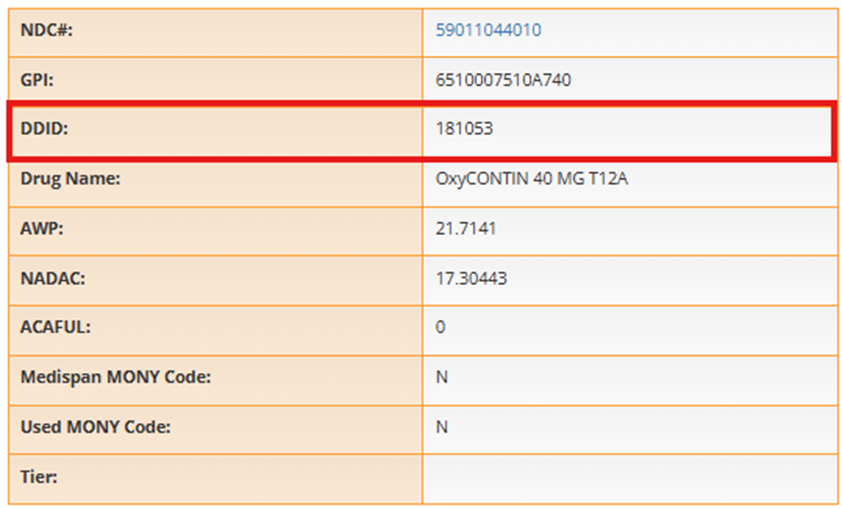
Add DDID to Transaction Detail Screen Drug (26726 / 26659) – The DDID was added to the drug box on the right-hand side of the Transaction Detail and Claim Processing screens.
Drug
Drug Lookup
Improved Lookup Performance (26290 / 26658 / 26977 / 26979) – To improve the overall speed of drug lookups within the UI on the Drug Lookup and Drug Search screens, Drug Data is now being cached behind the scenes daily. In most cases, the cached data will meet the lookup needs. To cover situations where up to the minute data is required (such as if a Manual Drug was added), a new Use Live Data option can be toggled on to perform the lookup against the current drug tables.
Note: During the UAT phase for clients running the 1.17.5 version in their UAT while 1.17.4 is still in production, you will need to manually run the Drug Search Cache Refresh job after the production to UAT copy down to get the drug data cached. This will no longer be required once 1.17.5 and above are deployed.

Plan Design
Group Manager
Update Export Row Limit to 25000 for Active Member List (26556 / 26697) – The export limit for Active Member Lists in Group Manager was changed from 1,000 records to 25,000 records.
Files and Jobs
Job Manager
New Option “Bypass Reject Codes From Subrogation” (26183) – A new reject code list was added to the Claim Submission job related to Subrogation processing (“ProcessSubrogation”). The new toggle allows a list of rejects to be defined that will by bypassed by the subrogation process. Not all rejects are supported, and rejects related to missing or invalid data will not be overridden.
This new option supports multiple rejects codes with a comma to separate them (no spaces). Common rejects that can be overridden are:
- PA Required (75)
- Plan Limitations Exceeded (76)
- Pharmacy Lock In (50)
- Prescriber Lock In (71)
- Other Rejects Codes triggered by a Process Rule (828)

A rule tracker event is logged when a transaction is overridden.

Billing & Fee Mgmt
Billing Manager
Prevent Tab Characters in WorkCompClaimId (20400) – The Billing Cycle Export file was updated to remove tab characters from the WorkCompClaimId field when populating the Billing Cycle Export file.
Payables Manager
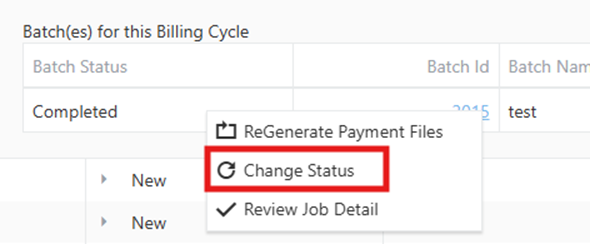
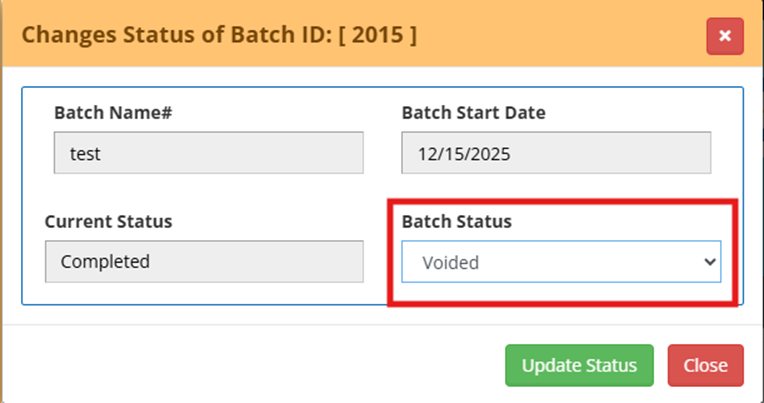
Voiding Batches (5840 / 26702) – The ability to void a batch was added. This process removes transaction from the batch, cleans up processed amounts, and restores Voucher and Payment Adjustment related records for reuse. A batch is voided via the Change Status option on the Batch which can be accessed by right clicking on the Batch record on the dashboard.
When a user attempts to void a batch, the system displays clear confirmation message in the bottom right corner explaining that the action is permanent and cannot be undone.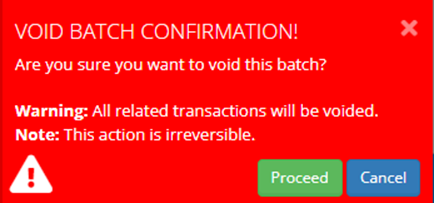
All associated payments, vouchers, and billing cycle records are updated to a status indicating they are no longer valid. Any vouchers or adjustments satisfied by the batch become available again. The process is not allowed if a voucher has already been satisfied by another future batch.
Each void action is logged with user details for audit purposes, and a new permission has been added to control access to this functionality, Custom-Control-Payables: VoidBatch. Users without this permission will not see the option to void batches at all in the drop-down menu
Help & Support
Release History
Release Notes: Add Notes for 1.17.4 (26570) – Added Release Notes for 1.17.4.
Medi-Span Updates
Two new documents were added to the Medi-Span Updates (26713) – The Medi-Span Updates page now includes updated documents about Multi-Source Code changes.
Database
New Fields
The following new fields were added as part of this release:
|
Database / Table |
Table |
Field |
Data Type |
Length |
|
Enrollment |
EntityBillingConfigs |
PaidBy |
Varchar |
50 |
|
PayRec |
Invoices |
PaidBy |
Varchar |
50 |
Bug Fixes
The Bug Fixes section of the Release Notes documentation is dedicated to existing functionality of the application that had a defect or system issue that was preventing it from functioning properly. No new functionality should be included in this section, so if you are not sure how a particular screen or area should be working, please refer to the User Guide for additional information.
User Profile
- The Add/Remove Picture option was removed from the User Profile screen. (26338)
Claim
Adjudication
- Submitting a claim that causes a DUR reject without an E5 (Professional Service Code) or E6 (Result of Service Code) value set will no longer cause a “Object reference not set to an instance of an object” 92 Reject when the E4 is still submitted. (26210)
- Removed extra DUR messaging when no custom message is set. (26328)
- Claims rejected for being outside of the applicable date range of the Group to Plan relationship now receive an 85 Reject: “85: CLAIM NOT PROCESSED (MISSING PLAN) PATIENT IS NOT COVERED (PLAN NOT FOUND)” instead of a generic 92 Reject. (26488)
Claim Activity
- Resolved an issue where drug information displayed as "N/A" when hovering over the NDC on rejected transactions lacking associated drug data. The field now appropriately displays blank in such cases. (26624)
- Updated the Quantity Column filter in the Claim Activity has been updated to support decimal values. (26627)
Claim Processing
- Fixed an issue where rerunning a reversed claim with a different NDC displayed incorrect drug info from the original claim in the Claim Processing and Transaction Detail drug details on the right hand side of the screen. (26801)
Plan Design
Group Manager
- Fixed a screen issue where benefit max amounts were missing from the Deduct/Cap tab if no termination date was entered on the Plan defining the Individual and Family benefits. (26806)
Plan Manager
- Fixed an issue where the chooser window for adding a prescriber network in Plan Manager showed 'Pharmacy Network' as the header instead of 'Prescriber Network'. (26804)
Rules & Calculator
Bill Cost Calculator
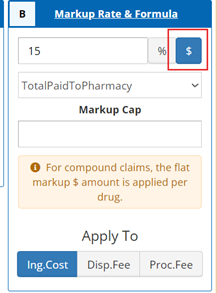
- Fixed the “$” Markup option in Box B of the Bill Cost Calculator to now add the set amount, plus any applicable fees, to the Sell Cost of the Claim. (26550)
- Updated the "Rule Name:" field to now be shown as required. (26547)
Files and Jobs
Job Manager
- Fixed an issue with the system memory references that caused issues for the web jobs deployments when creating a brand new client environment. (25973)
- Updated the validations on the Eligibility Import Job to prevent the addition of coverage periods earlier than the current coverage period for the member when using the Partial eligibility type. (26216)
Billing & Fee Mgmt
Payables Manager
- Fixed an issue where the “Done. Take me to Dashboard” button persisted after completing a batch and still showed when attempting to start or resume another batch. (26558)
- Resolved an issue in Step 4 of the Payables process where the count of Vouchers was not updated on completion of the step. (23933)
Production HotFixes
Claim
Adjudication
- 17.4 - Fixed an issue where the “Treat as Generic for Copay” option was applied for the member even if it is on an MPA that doesn’t qualify (i.e. drug doesn’t match) for the transaction. (26813)
Member
Member Search
- 17.4 – Updated the permission for the Member Search screen to use “Member Lookup” to allow for easier transition for clients that did not use the Member Search prior to this version. (26692)
- 17.4 - Updated a pagination error that would display results of a search using any of the active indicator settings, Active/Inactive/All, across multiple pages when it could fit in fewer or a singular page. (26928)
- 17.4 - Fixed an issue where performing subsequent searches did not reset the page number. (26908)
Drug
Formulary Manager
- 17.3 – Rolled back Formulary Import auditing functionality due to performance concerns on larger files. (26725)
Rules & Calculators
COB Rule
- 17.4 - Added the “CalculatedAmtMinusOPAR” option to the Payment Formula dropdown in COB Rule Manager. When used with Other Coverage Code 2, it subtracts the Other Payer Amount Paid (431-DV) from the claim calculation. The 566-J5 field now updates the OtherPayerAmountRecognized field in the Transactions table of the database. (26764)
Process Rules
- 17.4 - Fixed an issue where changing the Rule Type with "Reject With Code" enabled caused the Reject Code to reset when updating, instead of saving as ON. (26712)
Files and Jobs
Job Manager
- 17.3 – Claim Import - Increased a validation timeout to 3 minutes. (26888)
- 17.3 – Claim Import - Fixed an issue where imported reversal transactions were not properly linking to the originally paid transaction. (26878)
- 17.4 - Fixed an issue with Claim Adjustment job where the having zero in the accumulator fields was preventing the file from being loaded. (26902)
Billing & Fee Mgmt
Payables manager
- 17.4 - Resolved an issue where filters applied on step 2 were causing an error when attempting to advance to step 3. (26623)