RxLogic PBM Application Update
|
Update Type |
Minor |
|
Update Description |
This version update includes stabilization and performance items and various bug fixes. Added Features: · Ability to Return Multiple Rejections · Member UDF Maintenance Import · Capacity Improvements for Claim Import · Per Member Per Day Fee |
|
Existing Feature Behavior Changes |
· Standard Eligibility – Configurable Primary Person Code Enforcement per Client (29979) · Pharmacy Cards – NCCI Job Class Code Added to Worker’s Comp Format (29555) · Receivables – Claim Detail Report – New AuthNum Column (29076) |
|
Version Number |
1.18.2.2 |
|
Production Release Date |
4/21/2026 |
|
UAT Release Date |
4/8/2026 |
New Features
The New Features section of the Release Notes is dedicated to work items that are new functionality that were not in previous versions of the application. If you have additional questions on any of the new functionalities, please reach out to your RxLogic CSM.
Drug Tab
Drug Lookup
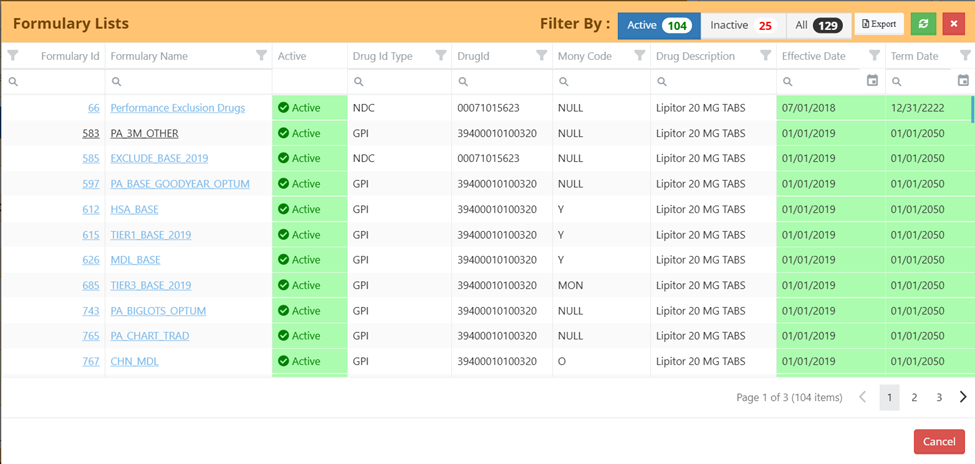
Active/Inactive Filters for Show Drug – Formulary (29571) – The Formulary Lists option under Show Drug now includes filters based on Active/Inactive. The default view is Active only.
Plan Design Tab
Plan Manager
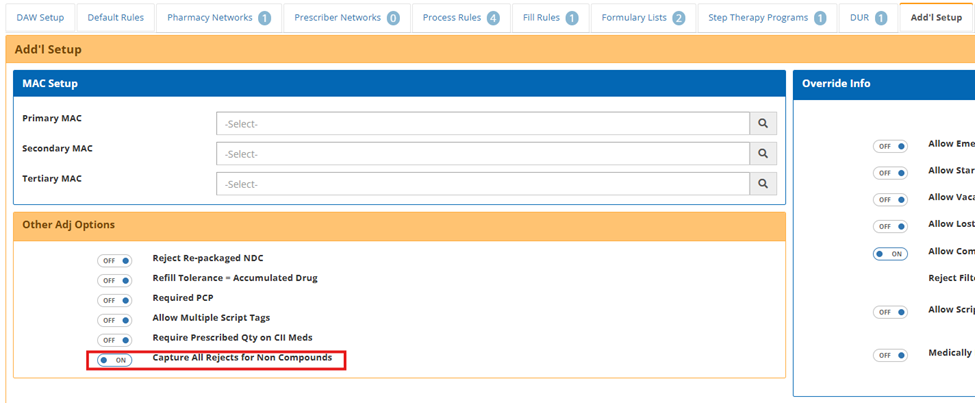
Plan Configuration Option to Return Multiple Reject Codes (30108 / 30822) – A new plan-level setting on the Add’l Setup tab, Capture All Rejects for Non Compounds, allows multiple reject codes identified during claim processing to be returned together instead of stopping at the first reject. This allows visibility into up to 4 applicable rejection reasons at once. This behavior applies to non-compound claims and continues to respect existing MPA Overrides.
Multiple rejections cannot be return on rejections for unknown Members, Pharmacies, or other early in the process rejections that would not allow the transaction to continue processing.
This current version excludes dollar related rejections that occur as a part of SDCs, Restriction Rules, or Max Claim Amount checks from being returned as a secondary rejection as pricing rules are still skipped if the transaction is going to reject. A future update will include these rejections as in scope.
Files and Jobs Tab
Job Manager
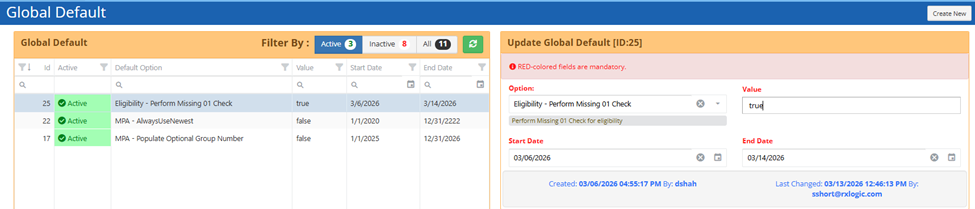
Standard Eligibility – Configurable Primary Person Code Enforcement per Client (29979) – A new Global Default option, "Eligibility - Perform Missing 01 Check" was added. When True, the Standard Eligibility will enforce that the 01 member must exist on system or on the file before adding dependent members.
Member UDF Maintenance Import (24856) – A new job was created, Member UDF Import, which supports operations of Creating, Updating, and Deleting UDFs for a member. Related UDFs are identified by the specific ID of the UDF record, or a combination of the Cardholder ID, Person Code, Group Number, and UDF Field Key.
This import includes validation enforcing that UDF Keys and Values follow what is defined in the UDF Manager within the application. For additional layout information, please reference the related file specification.
Claim History Import – Capacity Expansion (30120) – The Claim History process was updated to support larger file sizes without the need to split files. This allows for other built-in functions, such as Transaction Netting to occur properly against the full transaction set. Testing was conducted on files up to 250,000 records, but with a batch-based design the load is expected to handle files beyond that threshold.
As a part of this change, the file is now automatically sorted based on the provided Adjudication Date Time oldest to newest, with the originally provided order on the file as the tie breaker for sorting.
Pharmacy Card Manager
NCCI Job Class Code Added to Worker’s Comp Format (29555) – The “NCCI Job Class Code” was added as a new last field to the Worker’s Comp Format of the Card export. The “NCCI Job Class Code” field is in the Diagnosis Info Section of the Worker’s Comp tab for the Member.
Billing & Fee Mgmt Tab
Billing Manager
New Fee – ‘Per Member Per Day’ (29558) – A new hierarchy fee of 'Per Member Per Day' was added to support a calculation based on days eligible for members over the Batch period. This fee accounts for members that start or end coverage within the batch including coverage gap scenarios within the same entity. If enabled, this fee is automatically assessed without any special settings applied during the Receivables run. This option only supports the ‘Flat’ fee structure, with the fee calculated at the time of processing in Receivables.
Payables Manager
Voiding Logic on Netted Reversals (26923) – Voiding logic was improved to support batches run with the Perform Outside of Batch Netting Check. When a payment batch is voided, any related reversals are now correctly re‑evaluated instead of remaining incorrectly offset. This ensures payable amounts remain accurate when batches are voided and reprocessed.
Receivables Manager
Invoice Tab Now Hides Voided Invoices (30232) – Invoices related to a voided receivables batch will longer appear on the Invoice tab. This prevents voided activity from showing with an incorrect or misleading status.
Claim Detail Report – New AuthNum Column (29076) – The ClaimDetail and ClaimDetail-PatientPay reports were updated to add a new column, “Unique ID”, as the last column. This field includes the value from the transaction’s AuthNum (authorization number).
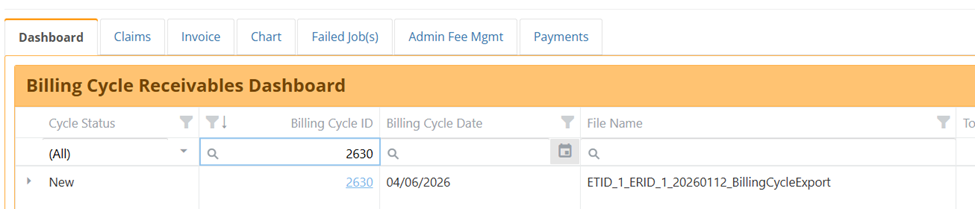
Addition of Column Header Filters to Dashboard (29968) – Filters on the Cycle Status, Billing Cycle ID, Billing Cycle Date, and File Name columns were added to the Dashboard grid.
Help & Support
Release History
Addition of 1.18.1 Release Notes (30481) – The 1.18.1 Release Notes were added.
Database
New Fields
The following new fields were added as part of this release:
|
Database |
Table |
Field |
Data Type |
Length |
|
Enrollment |
Plans |
CaptureAllRejectsForNonCompounds |
bit |
|
Bug Fixes and Minor Enhancements
The Bug Fixes and Minor Enhancements section of the Release Notes documentation is dedicated to existing functionality of the application that had an issue or received a minor update or improvement.
Claim Tab
Adjudication
- Fixed an issue where a reject 92 would occur if the submitted Prescriber ID contained a leading space. This situation will now be rejected with a 25 M/I Prescriber ID instead. (29994)
Paid Claim Lookup
- Improved filter clearing for pop up search windows when a value was entered into the search field and then cleared. (30263)
- Updated search results GPI link to open a Drug Lookup page that performs a search on the related GPI. (30271)
- Fixed search results Claim ID hyperlink to open the Claim Activity screen with a filter applied on the Claim ID. (30410)
Claim Activity
- Resolved an e.getFullYear is not a function error when filtering on the DOS Rx Date column. This was also resolved on the Transaction Details, and Payables Claims search screens. (30432)
- Fixed the Show for Past dropdown box to allow for selection of the dropdown via the arrow on lower resolution screens. (28747)
Member Tab
MPA Manager
- Updated the behavior for the StartsWith Group Search and pop-up handling. The pop-up no longer appears automatically, allowing a search using a wildcarded Group Number prefix. Entered values are now retained even if the pop-up is dismissed. The search option can still be clicked to open the pop-up when needed. (29553)
- Improved timeline auditing to better capture changes and deletions to MPA Process Rules, and UDFs attached to the MPA. These updates are go forward only and data capture will start with this release. (30705)
Member Search
- Updated Color displays in the Show MPA’s window to show dates with both a future effective and termination date in red, aligning with the Active/Inactive status. (30068)
Plan Design Tab
Carrier Manager
- Fixed Group Batch Term Update process invoked by changing a term date on the Carrier to once again terminate the requested Carrier_Groups, Groups, and Group_Plans records. (30833)
Plan Manager
- Resolved an issue where the Save button became unusable after the first save. Previously, the page had to be refreshed to save additional changes. (30423)
Files and Jobs Tab
Job Manager
- Billing Cycle File Export – Improved error handling when a pharmacy associated to a transaction was deleted. The export now stops and outputs additional logging of the problem instead of failing with an unclear message. RxLogic will still need to assist with recovery in this instance. (28119)
Billing & Fee Mgmt Tab
Payables Manager
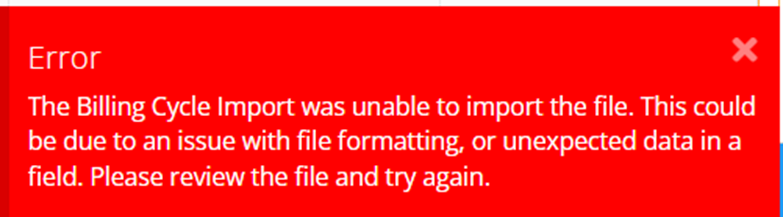
- Billing File Import – Improved handling of scenarios where all or a portion of the Billing Cycle import failed. An error message is now displayed, and the billing cycle is placed in a Failed status. This same update was made to Receivables. (20448)
- Fixed header totals when applying a filter on Step 2 of the process. (28698)
- Fixed an issue where the Start New Batch button in Payables Manager was not enabled even after selecting a Billing Cycle, displaying a prohibited sign and tooltip prompting to select a Billing Cycle. The button now enables correctly upon selection of a Billing Cycle. (30095)
- Fixed an issue in Payables Manager Step 2 where Date of Service filters (Is less than, is greater than, is less than or equal to, is greater than or equal to, is Between) were incorrectly filtering out all claims. (30114)
Receivables Manager
- Added logic to automatically refresh the Dashboard tab when navigating back to it from any section within Receivables Manager, including all tabs and steps of the Receivables Wizard. This ensures that any previously applied filters, selections, or expanded data do not persist, and the Dashboard always loads with the most up-to-date and default state. (30176)
User Administration Tab
Permissions
- Fixed Pop Up box to properly show the Permission Name instead of ID on save. (30866)
HotFixes
The HotFixes section includes both Enhancement and Bug related information applied to an earlier version after the publication of their Release Notes.
Site Wide
- 18.1 – Changed App Area caching to be refreshed each session. This prevents an issue where users would add newly added App Areas to their logins and the permissions would not take effect after logging out and back in. (30768)
Claim Tab
Adjudication
- 18.1 –Improved adjudicator caching performance for environments with a large number of subgroups (10,000+), significantly reducing startup and cache load times. (30717)
Claim Activity
- 18.0 – Resolved an error that occurred when trying to filter on the Pharmacy Paid field. (30138)
Claim Processing
- 18.1 – Updated logic for Skip External Adjudicators option to properly skip External Adjudicators on a reversal. (30372)
Member Tab
Member Search
- 18.0 – Fixed an issue where dependents would only show accumulations related to themselves for Family amounts, instead of totals from the entire family. (30430)
Rules & Calculators Tab
SDC Manager
- 18.1 – Fixed an issue where meeting the SDC Deductible was not properly calculating the copay properly on the cap being met. This included a fix for an issue where a $0 after Deductible met Copay was not recognized as valid and was ignored. (30844)
Files and Jobs Tab
Job Manager
- 18.1 – Invoice Payment Import – Changed logic to import a Payment record if at least one record related to the payment did not result in an error. (30711)
Billing & Fee Mgmt Tab
Receivables Manager
- 18.1 – Fixed an issue where voided batches were included in receivables totals, causing inaccurate amounts to display. Dashboard totals now correctly reflect only active billing activity. (30281)
- 18.1 – Fixed an issue where Location Code Names exceeding 50 characters were causing an error when importing data into Payables and Receivables. (30650)
Help & Support
Knowledgebase Tool
- 18.1 – Update reference to direct to a new Knowledgebase reference. This will be RxLogic’s new home for reference information and will be built out over time. (30748)