RxLogic PBM Application Update
|
Update Type |
Minor |
|
Update Description |
This version update includes stabilization and performance items and various bug fixes. Added Features:
|
|
Existing Feature Behavior Changes |
|
|
Version Number |
1.18.10.2 |
|
Production Release Date |
12/3/2026 |
|
UAT Release Date |
11/16/2026 |
New Features
The New Features section of the Release Notes is dedicated to work items that are new functionality that were not in previous versions of the application. If you have additional questions on any of the new functionalities, please reach out to your RxLogic CSM.
Claim Tab
Adjudication
F6 – Auto Enrollment Changes (33054) – In the F6 standard, the Patient Street Address Field (322-CM) is replaced with the Patient Street Address Line 1 (B08-7A) and Patient Street Address Line 2 (B09-7B) fields. For F6 transactions, Auto Enrollment now takes information from both fields to populate on the Member record. If Address is set as required for Auto Enrollment, the Patient Street Address Line 1 field becomes required to Auto Enroll a member.
Patient ID (332-CY) and its related qualifier (331-CX) can now be submitted multiple times on a transaction. Auto Enrollment was updated to use the first occurrence of the 01 Qualifier (SSN) to determine if the Patient ID is an SSN for population into the Member’s SSN field during an Auto Enrollment.
Claim Processing
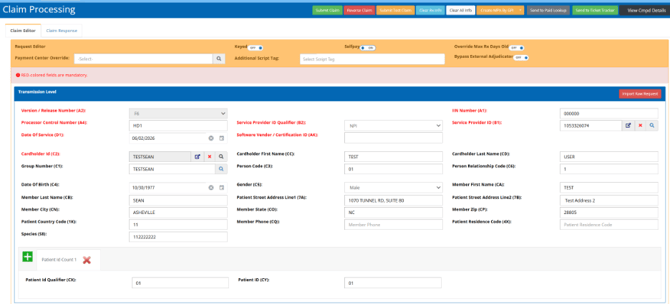
F6 Related Updates (39777 / 39801) – The following updates were made to the Claim Processing screen when viewing an F6 transaction:
-
F6 is now properly displayed in the Version dropdown.
-
The Patient ID and Qualifier are now a looping control to allow for submission of multiple Qualifier / Value pairs.
-
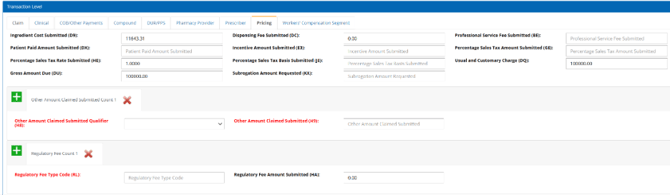
On the Pricing Tab, Regulatory Fee Type Code (D61-RL) and Regulatory Fee Amount Submitted (481-HA) are now a looping control.
Note: 481-HA was previously the Flat Sales Tax field in D.0.
Pricing Tab is pictured below:
Note: The Claim Processing screen in the application is now able to send F6 formatted transaction but can only do so if launched from an F6 transaction, or after importing a Raw Request in the F6 format. Additional changes for support are coming in future versions of the application.
Member Tab
MPA Manager
Override for Reject Code 22 – M/I DAW (39036) – A new MPA option, "Override M/I DAW (Reject Code: 22)", was added below the existing "Override Reject Code MR: Product Not on Formulary" option. When this option is enabled, MPAs can now override the Reject 22 that occurs when a pharmacy submits a DAW not supported on the plan. Without this option set, the transaction will continue to reject.
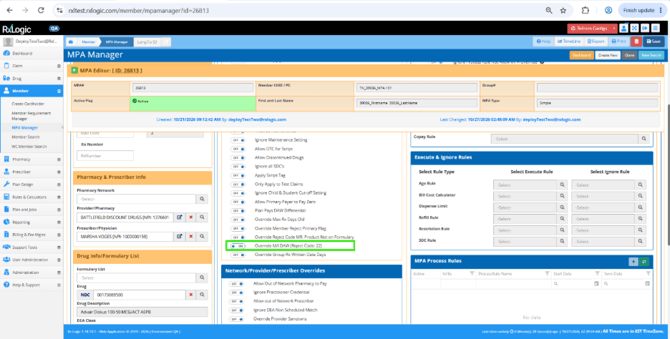
As a part of this change, the Rule Tracker events for the ValidateDAW rule were updated to give better indications of what happened during the evaluation of the rule.

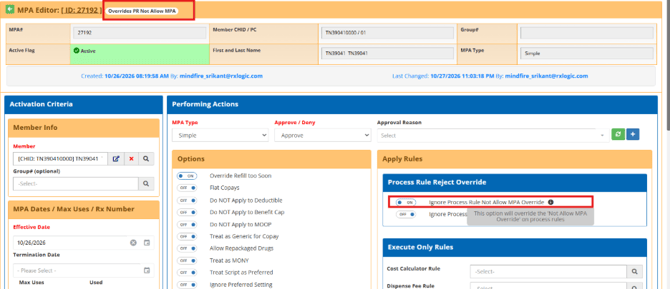
New Ignore Process Rule Reject Codes Option (38179) – A new “Process Rule Reject Override” section was added to the MPA screen, placed above the Execute Only Rules section on the right-hand side of the page. A new “Ignore Process Rule Reject Codes” option is included within this box. The Ignore Process Rule Reject Codes option is read-only unless the user has the “Custom-Control-MPA: ProcessRuleRejectCodes” app area permission.
Ignore Process Rule Reject Codes allows for the listing of one or many Reject Codes. If a Process Rule is set to Exclude for a listed reject that Process Rule is bypassed. If any reject code configured in a Process Rule is missing from the MPA, the Process Rule executes normally and rejects the claim. Please note that 70 and 75 rejects are overridden by default by the MPA.
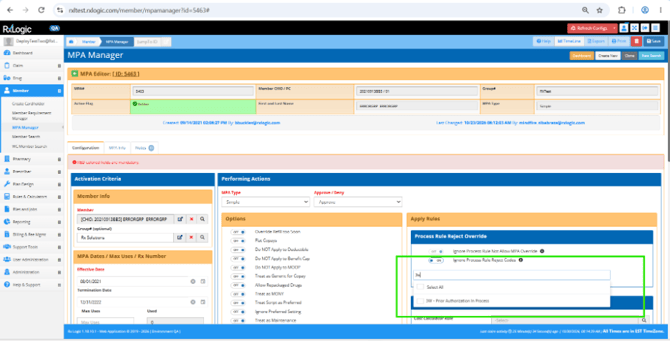
When a Process Rule is bypassed, the Rule Tracker displays a bypass message with the corresponding MPA and Process Rule Config ID.

Override For Not Allow MPA Override (39041) – An “Ignore Process Rule Not Allow MPA Override” option was added to the new Process Rule Reject Override section. This option allows for the MPA to be utilized for Process Rule rejects that are set with the Not Allow MPA Override option. As this override allows for skipping of an intentional plan design preventing the use of MPAs, only users with the “Custom-Control-MPA: ProcessRuleNotAllowMPAOverride” app area permission are allowed to set this option. A Rule Tracker event is output when an MPA used this setting to override a Process Rule that would have otherwise ignored the MPA.
MPAs with this option set include a badge at the top of the screen to call out the setting is in use. The Override PR – Not Allow MPA setting was also added to the MPA Search grid selectable in the Column chooser. When displayed, the field is included in the export file.
Plan Design Tab
Carrier Manager
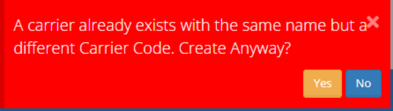
Remove Carrier Name from Duplicate Check (39203) – The carrier duplicate validation was updated to allow multiple carriers with the same Carrier Name, provided each carrier has a unique Carrier Code. A warning is displayed when creating, updating, or cloning a carrier with an existing name but a different Carrier Code, allowing users to continue or cancel. Duplicate Carrier Codes are still not allowed.
Step Therapy
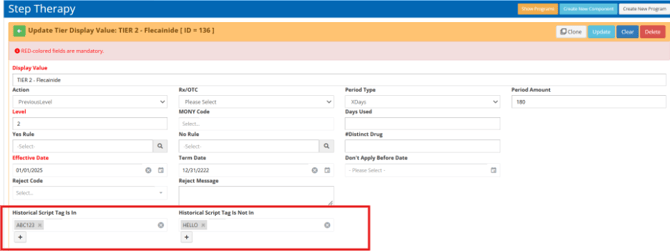
Historical Transaction Filtering by Script Tag (37264) – The ability to limit the scope of transaction history considered for a patient based on Script tag was added. Both the Tier and Line screens now include a “Historical Script Tag is In” and “Historical Script Tag is Not In” setting option. The Tier settings are used only if nothing is defined on the Line.
“Historical Script Tag is In” will limit the scope to only historical transactions that have one of the listed Script Tags, where “Historical Script Tag is Not In” will filter out any transaction that includes a listed Script Tag. Both can be used at the same time, with the Transaction being excluded if it has a Script Tag on the Not In even if it also has a Script Tag on the In list. These filters do not apply to the currently adjudicating transaction.
Fill Rules
Script Tag In / Not In Enhancements (39919) – The ability to filter Historical transactions using an Is or Is Not filter was added to Fill Rules in a prior release. This was limited to a single Script Tag with a selection of Is or Is Not. The functionality was enhanced to now allow both In and Not In to be defined with multiple script tags at the same time.
“Historical Script Tag is In” will limit the scope to only historical transactions that have one of the listed Script Tags, where “Historical Script Tag is Not In” will filter out any transaction that includes a listed Script Tag. Both can be used at the same time, with the Transaction being excluded if it has a Script Tag on the Not In even if it also has a Script Tag on the In list. These filters do not apply to the currently adjudicating transaction. An explanation of the filters in place can be found in the Applicable Profile Claims are Determined By box on the screen. 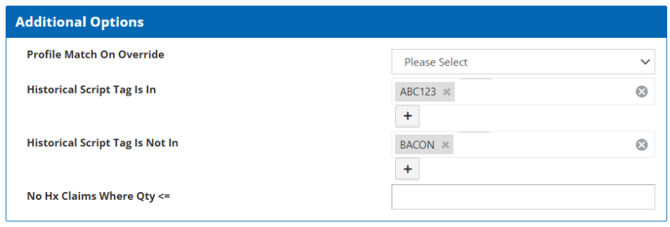
Rules & Calculators Tab
Process Rules
Count Accumulation of Other SDCs Towards an SDC (39139 / 39318) – A new “Include SDCs in Accumulation” option was added to Process Rules under Accum Actions as a child of “Apply this SDC”. Include SDCs in Accumulation allows selection of one or more SDCs. Totals from these SDCs are included in the totals when evaluating the SDC being applied. Dollars from the listed SDCs are treated as the type of the applied SDC and follow its defined time period. 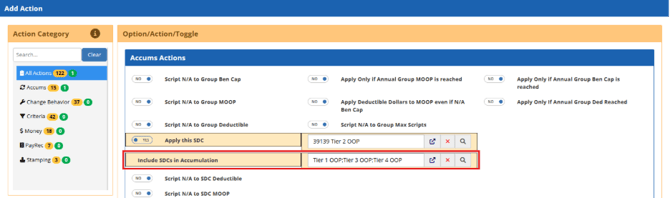
During adjudication, accumulation is only applied to the to the ‘Apply this SDC’ value, but the other accumulations that factor into the total are noted within the Rule Tracker output in the ExecuteMemberBenefits section.

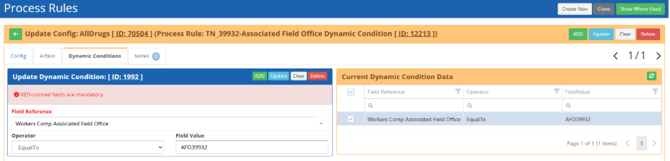
Dynamic Conditions for Associated Field Office (39932) – Process Rule configuration now includes “Workers Comp Associated Field Office” as a selectable field in dynamic conditions. The AFO value used is taken from the Workers’ Compensation claim record tied to the transaction.
F6 - New Dynamic Condition for Compound Level of Complexity (33051) – A new dynamic condition, “Compound Level of Complexity [C60-AG]”, was added. This field is in the F6 Version only and is used to represent the difficulty in making a Compound. Some examples of values are 01 – Low Level Complexity, 10 – Mid-Level Complexity Non-Hazardous, and 31 – High Level Non-Hazardous Sterile.
Restriction Rules
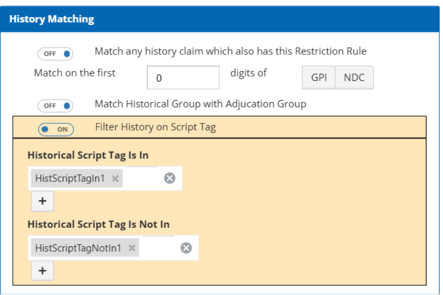
Script Tag In / Not In Enhancements (39920) – The ability to filter Historical transactions using an Is or Is Not filter was added to Restriction Rules in a prior release. This was limited to a single Script Tag with a selection of Is or Is Not. The functionality was enhanced to now allow both In and Not In to be defined with multiple script tags at the same time.
“Historical Script Tag is In” will limit the scope to only historical transactions that have one of the listed Script Tags, where “Historical Script Tag is Not In” will filter out any transaction that includes a listed Script Tag. Both can be used at the same time, with the Transaction being excluded if it has a Script Tag on the Not In even if it also has a Script Tag on the In list. These filters do not apply to the currently adjudicating transaction.
Files and Jobs Tab
Job Manager
Card File Export - Determine Primary by Relationship Code (38558) – For better support of programs using a Person Code of 00 for the Primary member, the Card File Export now determines a Primary member as one with a Relationship Code of 1, rather than looking for a Person Code of 01.
Eligibility Import – Backdating of Current Period (39725) – The “Partial” file type expects that only the most recent coverage period is provided for a member. If a member’s effective date is sent incorrectly, and a later file sends an earlier date, the record errors for overlapping coverage. Correcting the date required resubmission of the file as a “Full” type, but this requires extra work if the member had more than one coverage period.
To simplify this situation, a new “Allow Backdating to Current Period” option is now available on the Eligibility Import. When set to true, this allows the dates of the most recent coverage period of the member to be backdated instead of erroring the record for an overlap when using the Partial File Type. If the incoming effective date is earlier than the current period's effective date and the incoming period overlaps the current period, the incoming period replaces the current one.
An example of this is in the grid below, where the member has coverage 2/1/2026 to 12/31/9999. If the new Allow Backdating option is turned on, and a period of 1/1/2026 to 12/31/9999 is provided, the result is the member having the 1/1/2026 to 12/31/9999 coverage period. This applies to the Cardholder, Group, and Subgroup coverage dates.
|
|
Effective Date |
Termination Date |
|
Before: |
2/1/2026 |
12/31/9999 |
|
Provided: |
1/1/2026 |
12/31/9999 |
|
After: |
1/1/2026 |
12/31/9999 |
The Termination Date does not need to remain the same for this logic to work. Additionally, if the provided Effective Date overlaps with an earlier coverage period, the earlier coverage period will be automatically terminated the day before the new Effective Date. If the provided date overlaps with more than the latest and one other coverage period, the record errors.
Member UDF Import – Improvements for Daily Use (39845) – The Member UDF import was created as an easy way to one off import UDF related data for Members and make updates to existing values. With use cases for providing this data daily, the following improvements were made to the import:
-
The Add / Update Action Code requirement has been removed, with only a ‘D’ for delete being necessary
- If a member does not have any records for the UDF Field Key, a new record is added
- If the member already has a record for the UDF Key:
- If the provided record has the same effective date, the term date and value will be updated based on the record provided
- If the provided record has a different (future) effective date, the prior record is auto termed the day before the effective date of the new record and the new record is added.
- If the provided record has a different (past) effective date but overlaps an existing record, it completely replaces the existing record.
- A specific record’s UDF Key can be updated if the ID of the record is provided on the import.
Support Tools Tab
Ticket Tracker
Ability to Change Required Fields and Default Values (38392) – A new Config Options button was added to the top of the Ticket Tracker screen that allows configuration of the required fields and default values for the fields. Only users with the “Custom-Control-TicketTracker: Config Options Maintenance” app area permission will see this button and be able to set the configuration settings. Settings apply across all users in the environment.
To enable the custom field requirements, toggle the Use Config Options Setting to Yes.
The Title, Support Event Direction, Reason, and Status fields are required by default. Other fields can be toggled to be required or not. Fields with an enabled PrePopulate value can be used to select the default value for the field. If Prepopulate is set to “Select” the user must choose a value when creating the ticket.
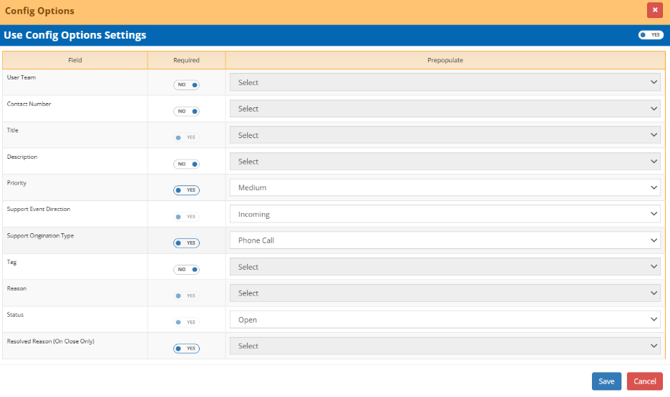 Please note that Resolved Reason field applies on Close Only, allowing the value to be required but only when the ticket is closed.
Allow Non User Admin Users to Assign to Other Users (39986) – A new Global Default of “Ticket Tracker - Allow Non User Admins to Assign to All Users” was added. If this option is not defined or set to False, a Non User Admin user is only able to see themselves when opening the User Library in the Assign User box. This matches the behavior before this release.
If this option is set to True, users can see a list of all other users for the environment. This option should only be enabled in an environment where it is safe for Ticket Tracker users to be able to see a full list.
User Administration Tab
User Management
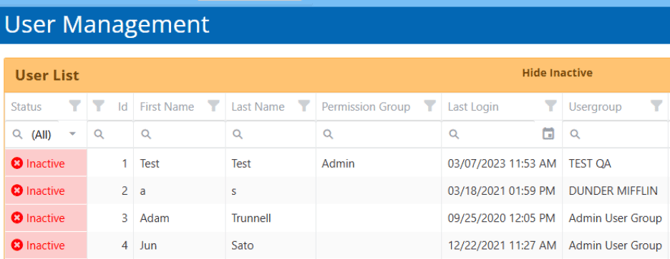
Last Login and Permission Group in Grid (39259) - The User Management grid was updated to include Last Login and Permission Group columns. The Permission Group column displays the associated group name, while Last Login displays the user's last login date and time. Both columns support sorting and filtering and are included in the exported user list.
Both columns appear on the far right of the Grid, but their position can be moved temporarily for on screen review of these values.
Administration Tab
ApiKey Management
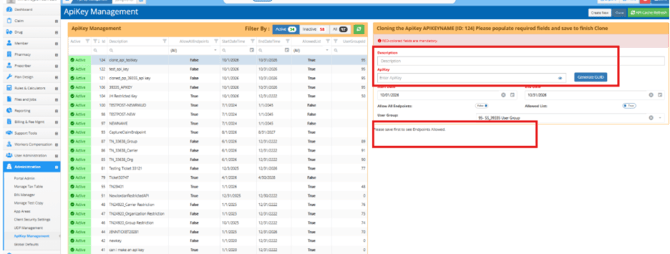
Clone Option (39333) - A Clone option was added to simplify API Key creation using existing configurations. The Description and API Key fields are cleared during cloning, while Start Date, End Date, Allow All Endpoints, Allowed List, and User Group values are retained from the original API Key.
APIs
MemberEnrollment
Optional Field for Update User (39256) – A new optional “UpdateUser” field was added to the request. When a value is provided, it will be used for the Created By and Changed By values instead of the default “MemberEnrollmentAPI” value. UpdateUser allows a max of 64 characters and does not need to be a valid user in the environment. For additional information please reference the updated API documentation.
Addition of Client Custom Fields (39141 / 39142) – The ClientCustom1 through 5 fields were added to the request object of the MemberEnrollment endpoint, as well as the response object for the GETMemberEnrollment endpoint. Values of up to 50 characters can be provided in these fields and are displayed within the UI when viewing a member record. For additional information please reference the updated API documentation.
Database
New Fields
The following new fields were added as part of this release:
|
Database |
Table |
Field |
Data Type |
Length |
|
Enrollment |
MemberPriorAuths |
IgnoreProcessRuleNotAllowMPAOverride |
BIT |
|
|
Enrollment |
MemberPriorAuths |
IgnoreProcessRuleRejectCodes |
BIT |
|
|
Enrollment |
MemberPriorAuths |
IgnoreRejectCodes |
NVARCHAR |
128 |
|
Enrollment |
LookbackRuleLines |
HistoricalScriptTagIsIn |
NVARCHAR |
255 |
|
Enrollment |
LookbackRuleLines |
HistoricalScriptTagIsNotIn |
NVARCHAR |
255 |
|
Enrollment |
StepTherapyLines |
HistoricalScriptTagIsIn |
NVARCHAR |
255 |
|
Enrollment |
StepTherapyLines |
HistoricalScriptTagIsNotIn |
NVARCHAR |
255 |
|
Enrollment |
StepTherapyTiers |
HistoricalScriptTagIsIn |
NVARCHAR |
255 |
|
Enrollment |
StepTherapyTiers |
HistoricalScriptTagIsNotIn |
NVARCHAR |
255 |
|
Enrollment |
FillRuleLines |
HistoricalScriptTagIsIn |
NVARCHAR |
255 |
|
Enrollment |
FillRuleLines |
HistoricalScriptTagIsNotIn |
NVARCHAR |
255 |
|
Enrollment |
TicketTrackerFieldSettings |
Id |
INT |
|
|
Enrollment |
TicketTrackerFieldSettings |
FieldKey |
VARCHAR |
64 |
|
Enrollment |
TicketTrackerFieldSettings |
IsRequired |
BIT |
|
|
Enrollment |
TicketTrackerFieldSettings |
PrepopulateValue |
VARCHAR |
64 |
|
Enrollment |
TicketTrackerFieldSettings |
CreatedDate |
DATETIME |
|
|
Enrollment |
TicketTrackerFieldSettings |
CreatedBy |
VARCHAR |
64 |
|
Enrollment |
TicketTrackerFieldSettings |
EditedDate |
DATETIME |
|
|
Enrollment |
TicketTrackerFieldSettings |
EditedBy |
VARCHAR |
64 |
|
Enrollment |
JobExecutionParameters |
Description |
VARCHAR |
512 |
Bug Fixes and Minor Enhancements
The Bug Fixes and Minor Enhancements section of the Release Notes documentation is dedicated to existing functionality of the application that had an issue or received a minor update or improvement.
Site Wide
-
Fixed spelling of Authorization in the description for Reject 3X – Authorization Number Not Found. (39729)
Claim Tab
Adjudication
-
Updated adjudication pricing logic to correctly utilize historical ACAFUL and NADAC pricing records when current pricing is no longer available on the Medispan Government Pricing File (FGPFILE). Previously, transactions with older dates of service would not use ACAFUL or NADAC pricing if the drug record had fallen off the current file. (38468)
-
Changed the behavior of the Pharmacy Network rule to no longer execute when the transaction is a duplicate to prevent a possible error where a duplicate could reject for a 40: Pharmacy Not Contracted. (37745)
-
Fixed an issue where State Fee Schedule dispensing fee was included in the lower of pricing comparison for a Compound ingredient, causing an incorrect lower of determination. (39727)
-
F6 – Updated the Parser definition to include Response Fields and structures. This defines the response structure but does not add any new functionality. (33481)
Transaction Details
-
Fixed an issue where the raw data for an F6 transaction was showing with a D.0 formatted header instead of the stored F6 data. (36295)
Drug Tab
Import Manager
Resolved an issue where importing large MAC List files (200,000+ records) could time out or result in an incomplete load. The item-level audit logging process was updated so that large imports now complete reliably. (39359)
Member Tab
MPA Manager
-
Fixed the Custom-Control-MPA: RefillTooSoon app area permission to restrict the usable fields on the MPA screen to just the Refill Too Soon override instead of all overrides. (39981)
Member Search
-
Updated the automatic Print Card Request creation logic on Name or Coverage Code change to use Relationship Code of 1 to determine if the member is Primary. These requests are used or ignored based on settings on the Print Cards job. (38557)
-
Resolved an issue where a member’s accumulator totals were incorrectly displayed as zero in the Member Benefit Summary after the member was terminated from a group. The issue also caused the Individual Spend amount to appear blank in the Accumulator Detail screen, even when the group was configured with “Individual Only Satisfied”. (35337)
-
Fixed an issue that would cause the display for the Benefit Start / Benefit End values to be shifted by one day depending on user time zone. (37181)
-
Fixed an issue where an incorrect limit could be shown for a Deductible, OOP, or Benefit Cap based on the user time zone. (39675)
Plan Design Tab
Group Manager
Updated the deletion of a Group to remove any references for the group within the Billing Manager and Billing Reports. (37316)
Location Manager
-
Updated the Location Code Import Wizard to properly allow for names up to 100 characters. (39847)
Rules & Calculators Tab
COB Rule
-
Fixed an issue where the Reject Claim option could not be set and would always show as False even when set as True in the database. (39962)
Files and Jobs Tab
File Manager
-
Fixed an issue that prevented access to folders created by the PayRec application that contained a comma in the name. (38403)
Job Manager
-
Claim History Import – Fixed an issue that prevented import of the IsPreferred and SenderID values. These values are fields 50 and 51 respectively. (39162)
-
Eligibility Import - Resolved an issue where a duplicate key error could be returned during Full File Eligibility processing when a member had multiple historical entries for the same group. (23367)
-
Federal Government Pricing Load – Updated the process to support file version 3. This file is set to fully roll out towards the end of 2027 and contains new fields for HCPCS Code and HCPCS Dosage. No enhancements were made other than maintaining compatibility with the new file. (38351)
-
NCPDP Sync – Updated job to allow it to finish without timing out on low powered environments. (39140)
User Administration Tab
User Management
-
Resolved an issue where the Last Login timestamp was not being updated when a user logs in with 2 Factor Authentication. (39040)
Help & Support
Release History
-
Added version 1.18.9 Notes. (39779)
APIs
Claim History
-
Updated behavior of the IncludeRejections parameter to no longer require IncludeFullHistory to also be set to return rejections. (39619)
HotFixes
The HotFixes section includes both Enhancement and Bug related information applied to an earlier version after the publication of their Release Notes.
Site Wide
- 1.18.9.2 - Corrected a spelling error in the “IsSpecialty” field in Tx Database, as well as the “TreatAsSpecialty”, ”IgnoreTreatAsSpecialty”, and “ApplyOnlyIfSpecialty” fields on the ProcessRuleConfigs table in Enrollment database. (40302)
Claim Tab
Adjudication
-
1.18.9.2 - Updated the External Adjudication Capture Pricing Only option to use the External Adjudication defined group when sending to External Adjudicator rather than the submitted group. (39989)
Member Tab
MPA Manager
-
1.18.9.2 – Fixed a regression issue where an MPA on a Plan with the Capture All Rejects for Non Compounds enabled could override a rejection that required an additional toggle such as Refill Too Soon without the toggle set. (40345 / 40419)
Pharmacy Tab
Network Manager
-
1.18.9.2 - Resolved an issue where the Network Provider Type filter was not applied correctly when a state-specific process rule was attached to a plans network. (39982)
Files and Jobs Tab
Job Manager
-
1.18.9.2 – Claim Import - Resolved an issue where imported claim reversals were incorrectly rejected with the error “Reversal without claim in paid status,” even when the reversal exactly matched the original paid claim’s reversal key when a non-null fill number was provided. Reversals are now matched correctly to the paid claim with matching fill number. (40392)
Reporting Tab
Report Manager
-
1.18.9.2 - Fixed an issue where saving a report record could cause the arguments to become corrupt and prevent the job from running in the future. (40277)
Billing & Fee Mgmt Tab
Receivables Manager
-
1.18.9.2 – Fixed an issue where the ID Card Fee was not being properly assessed during Receivables billing. (39948)
APIs
GET MEMBER ENROLLMENT
-
1.18.9.2 – Updated the new GetMemberEnrollment endpoint to respect the User Group permissions assigned to the API Key used on the request. (39335)