RxLogic PBM Application Update
|
Update Type |
Minor |
|
Update Description |
This version update includes stabilization and performance items and various bug fixes. Added Features:
|
|
Existing Feature Behavior Changes |
|
|
Version Number |
1.18.7.2 |
|
Production Release Date |
9/8/2026 |
|
UAT Release Date |
8/26/2026 |
New Features
The New Features section of the Release Notes is dedicated to work items that are new functionality that were not in previous versions of the application. If you have additional questions on any of the new functionalities, please reach out to your RxLogic CSM.
Member Tab
Member Search
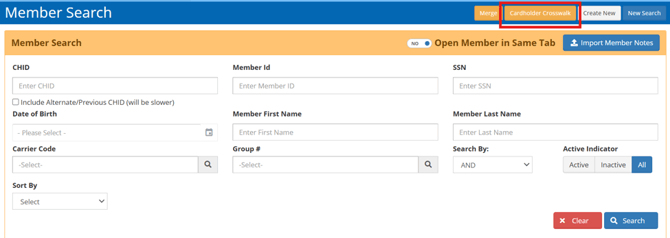
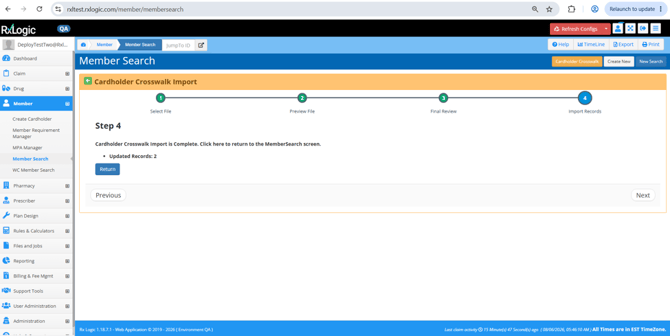
Cardholder ID Crosswalk (18860) – A new Cardholder Crosswalk option that allows CHIDs to remapped to new CHIDs via an import wizard was added to the Member Search and WC Member Search screens. This option is only visible to users with the Custom-Control-Member: CardholderCrosswalk app area.
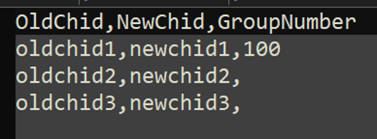
The Cardholder Crosswalk accepts a comma delimited file of the current Cardholder Id (OldChid), the new Cardholder ID (NewChid), and an optional Group Number (GroupNumber) that is used as a tiebreaker should the OldChid exist multiple times. A template file is available on step 1 of the wizard. When creating this file, the CHID of the primary is all that is required and the CHID should not be repeated for each member of the family.
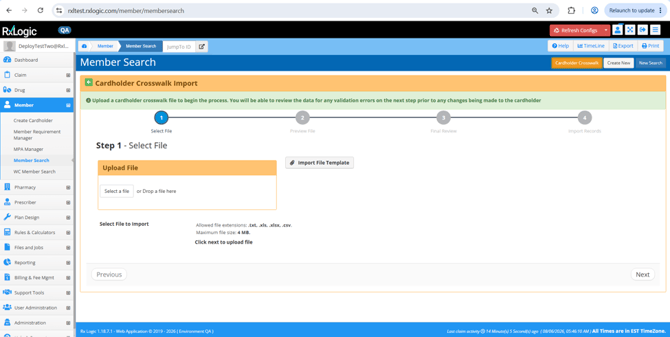
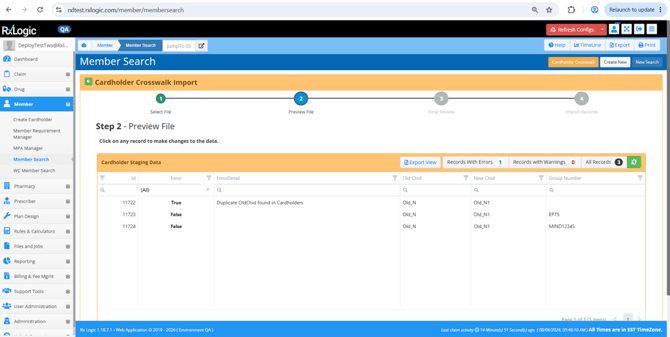
Step 2 of the process allows for review of errors, and manual correction by clicking on a record. Errors for duplicate Old CHIDs, Old CHIDs not matching a known value, New CHID already existing on system, and other validation errors are displayed here.
Step 3 of the process allows for a review of the updates that will be applied. This is for a final check and is the records from step 2 with any unresolved errors removed.
Step 4 of the process indicates the number of records updates, or if any unexpected
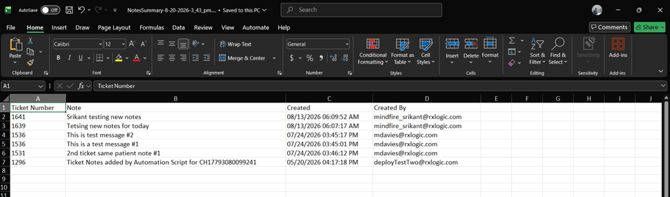
Ability to Export Member’s Notes Summary (35894) – An export option was added to the Interactions -> Notes Summary window, allowing export of an Excel (.xlsx) output of ticket related notes for the member.
The export is generated in the same format displayed in the Notes Summary window and includes the following columns:
- Ticket Number
- Note
- Created
- Created By
Organization Manager
Organization Bulk Import (29567 / 36281) – A new Organization bulk import wizard was added to the Organization Manager screen. This option is only visible to users with the Custom-Control-Organization: BulkImport app area.
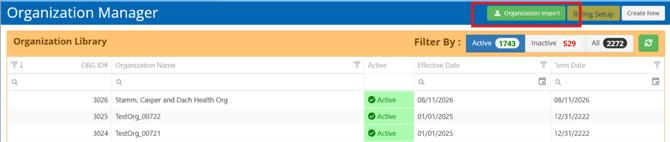
The Organization Manager import is a pipe delimited import requiring at minimum the name of the Organization, and the Effective Date, but allowing for import of Address, Contact, and UDF Information. This import is for the creation of brand new Organizations only. A template for this import is available on step 1 of the wizard.
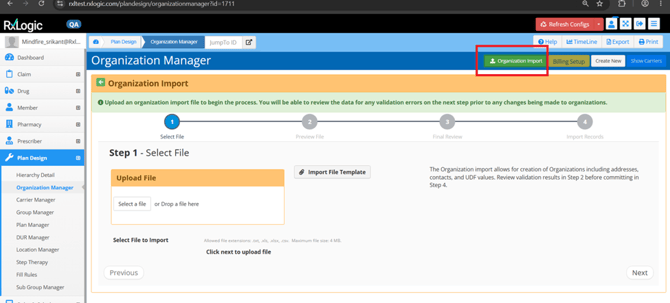
Step 2 of the process allows for review of errors, and manual correction by clicking on a record. Errors for missing the required Organization Name and Effective Date, and validations on provided UDF values are shown here and can be remediated by clicking on the record. The provided Organization Name must be unique and cannot match an existing Organization on system.
While most fields are self-explanatory on expected values, please note that the Secondary Address Type field supports values of Physical, Mailing and Other.
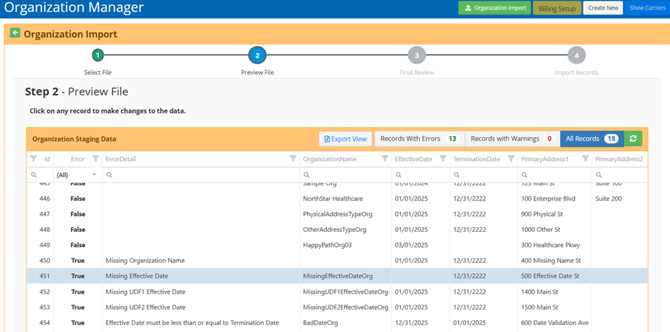
Step 3 of the process allows for a review of the updates that will be applied. This is for a final check and is the records from step 2 with any unresolved errors removed.
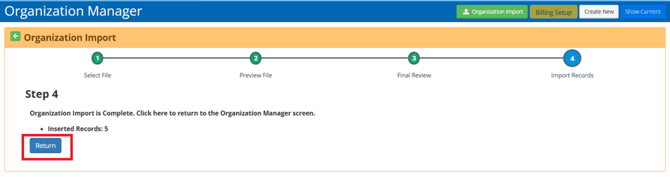
Step 4 of the process indicates the number of records created, or if any unexpected errors were experienced during the process.
Files and Jobs Tab
Job Manager
Standard Eligibility Update for Additional Relationship Codes (35855) – The Relationship Code field on the Eligibility Import has been expanded to support values of 0, 4, 5, 6, 7, 8 in addition to original 1, 2, and 3. Supported values are now:
- 0 – Not Specified
- 1 – Cardholder
- 2 – Spouse
- 3 – Child
- 4 – Other
- 5 – Student
- 6 – Disabled Dependent
- 7 – Adult Dependent
- 8 – Significant Other
Pharmacy Card Manager
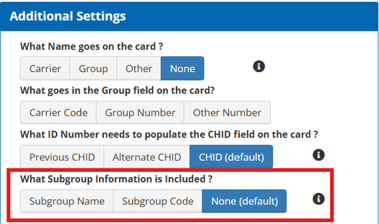
Ability to Include Subgroup Information on Output (35872) – Subgroup can now be included as a new last field for the Default, Workers Comp, and Consolidated output formats. On all existing jobs and by default this option will be set to None which leaves the existing format as is.
When set to Name or Code, a new Subgroup field is added to the header, and the selected Name or Code is placed in this field. As the Name (first option) in Additional Settings is also optional, the Subgroup appears after the Name field if it is selected.
Billing & Fee Mgmt Tab
Receivables Manager
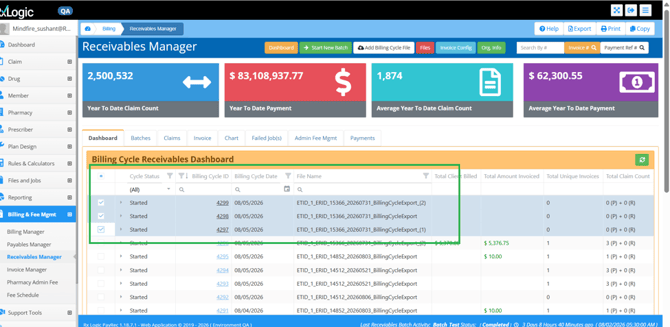
Ability To Select More Than One Billing Cycle Per Batch (35238) – The Receivables process was enhanced to allow for processing of more than one Billing Cycle file as part of a batch. The process starts by selecting one or many Billing Cycles from the dashboard screen, right clicking and starting the batch. The wizard process was updated to show references to the selected Billing Cycle Ids and dates throughout the process.
Like processing multiple Billing Cycles in Payables, output files are placed in the date folder of the highest Billing Cycle ID.
Support Tools Tab
Ticket Tracker
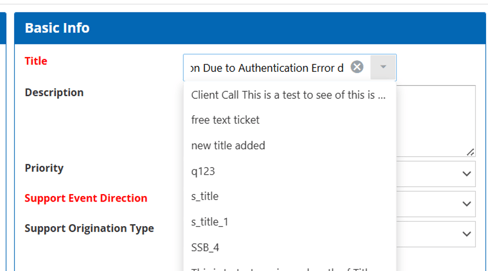
Ability to Use List of Values for Title Field (35290) – The Title field of a Ticket can now optionally be used as a dropdown list. A permission discussed in the next item controls which users can set values in the dropdown list.
Enabling the field to require a selection from a dropdown is done via the Global Default options on the Administration Menu by the Ticket Tracker - Require Title Selection from Dropdown option. Clients that do not set this or set this value to False will continue to allow Free Text entry into the title field but can also define templates in the dropdown as starting text should they desire.
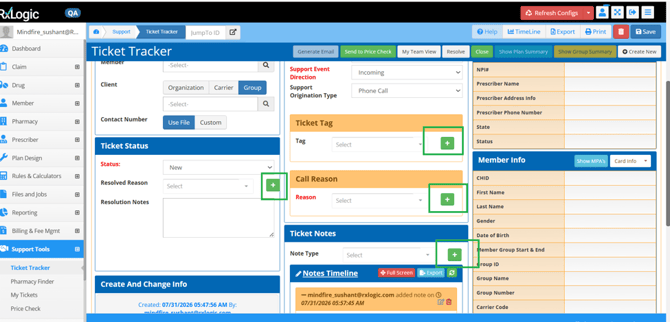
New Permission for Dropdown Option Lists (35289) – The ability to limit which users can make modification to Dropdown values for Title, Tag, Reason, Resolved Reason, Note Type, and Call Reason (Related Items tab) was added. This is controlled by the Custom-Control-TicketTracker: DropdownOptionsMaintenance option. Users without this permission will no longer see the Add/Edit or + controls that appear to the right of the field.
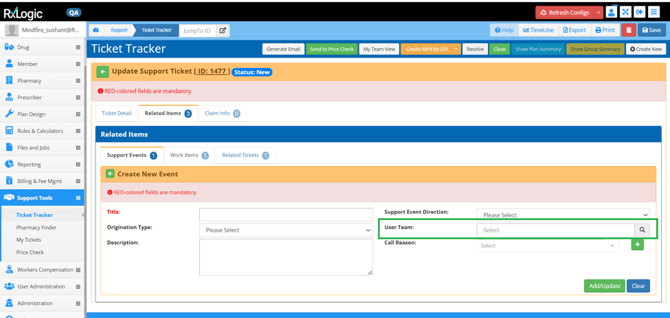
User Team Field on Support Events Tab (35296) – The Support Events tab under Related Items allows for finer tracking of actions when resolving a support ticket. To more clearly identify the responsible team, the existing Team Assignment field was removed and replaced with a new User Team field that allows selection of the related team through a library selector.
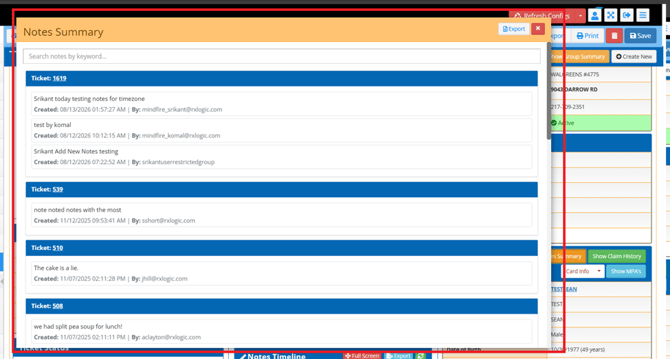
Notes Summary Option (35858) – A new Notes Summary hyperlink was added to the Ticket Tracker -> Member Info header alongside the existing Card Info, Show Claim History, and Show MPAs links. When a ticket is associated with a member, selecting Notes Summary opens a summary of Notes from any related Ticket Tracker ticket, like the Interactions -> Notes Summary window on the Member. This provides direct access to ticket-related notes and member interaction history without leaving Ticket Tracker.
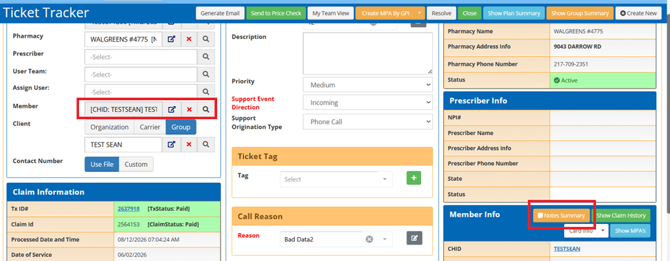
The ability to Export the Notes Summary information was included in this location as well.
User Administration Tab
User Management
Centralized Management of User App Areas via Permissions (35752) – A new Permission Group field was added to the User. This is an optional value and can be left blank. Users assigned to a Permission Group have their permissions managed by that group, instead of individual permissions on their User. This allows for centralized management of many User’s app areas by assigning them to a Permission Group as changes to the Permission Group are automatically applied to these Users on their next login.
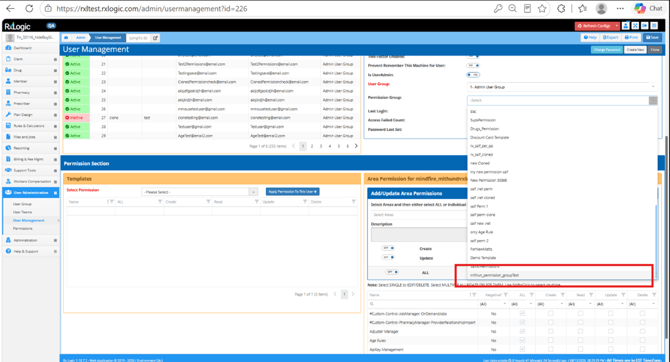
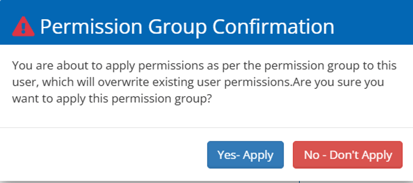
When a Permission Group is applied, the Area Permissions and Templates sections become read-only to prevent manual changes. Users can be removed from a Permission Group at any time by returning the value to -Select-, leaving the User with the App Areas from the Permission Group but allowing them to be individually maintained again. When assigning a Permission Group to a User, a confirmation prompt comes up to give a confirmation that the current App Area permissions will be overwritten.
APIs
Claim History
Claim History Client API - Update for Reject Support (35853) – The ClaimHistory Client API now supports an optional request parameter, IncludeRejections, allowing clients to control whether rejected transactions are returned as a part of the response. When IncludeRejections = True, the API response will include rejected transactions along with two new fields:
- RejectCode – returns the reject code(s) associated with the transaction (comma‑separated when multiple apply).
- TransactionStatus – returns Paid, Reversed, or Rejected.
Database
New Fields
The following new fields were added as part of this release:
|
Database |
Table |
Field |
Data Type |
Length |
|
Auth |
UserPermissionTemplates |
Id |
INT |
|
|
Auth |
UserPermissionTemplates |
UserId |
INT |
|
|
Auth |
UserPermissionTemplates |
PermissionTemplateId |
INT |
|
|
Enrollment |
SupportEvents |
UserTeamId |
INT |
|
|
Enrollment |
SupportTickets |
SupportTitleId |
INT |
|
|
Enrollment |
SupportTitles |
Id |
INT |
|
|
Enrollment |
SupportTitles |
Name |
VARCHAR |
64 |
|
Staging |
OrganizationImportStaging |
Id |
BIGINT |
|
|
Staging |
OrganizationImportStaging |
PbmImportId |
INT |
|
|
Staging |
OrganizationImportStaging |
HasError |
BIT |
|
|
Staging |
OrganizationImportStaging |
ErrorTypeId |
TINYINT |
|
|
Staging |
OrganizationImportStaging |
ErrorDetail |
VARCHAR |
255 |
|
Staging |
OrganizationImportStaging |
OverrideError |
BIT |
|
|
Staging |
OrganizationImportStaging |
OrganizationName |
VARCHAR |
64 |
|
Staging |
OrganizationImportStaging |
EffectiveDate |
VARCHAR |
24 |
|
Staging |
OrganizationImportStaging |
TerminationDate |
VARCHAR |
24 |
|
Staging |
OrganizationImportStaging |
PrimaryAddress1 |
VARCHAR |
64 |
|
Staging |
OrganizationImportStaging |
PrimaryAddress2 |
VARCHAR |
64 |
|
Staging |
OrganizationImportStaging |
PrimaryAddressCity |
VARCHAR |
64 |
|
Staging |
OrganizationImportStaging |
PrimaryAddressState |
VARCHAR |
2 |
|
Staging |
OrganizationImportStaging |
PrimaryAddressZipCode |
VARCHAR |
10 |
|
Staging |
OrganizationImportStaging |
SecondaryAddressType |
VARCHAR |
20 |
|
Staging |
OrganizationImportStaging |
SecondaryAddress1 |
VARCHAR |
64 |
|
Staging |
OrganizationImportStaging |
SecondaryAddress2 |
VARCHAR |
64 |
|
Staging |
OrganizationImportStaging |
SecondaryAddressCity |
VARCHAR |
64 |
|
Staging |
OrganizationImportStaging |
SecondaryAddressState |
VARCHAR |
2 |
|
Staging |
OrganizationImportStaging |
SecondaryAddressZipCode |
VARCHAR |
10 |
|
Staging |
OrganizationImportStaging |
PrimaryContactTitle |
VARCHAR |
64 |
|
Staging |
OrganizationImportStaging |
PrimaryContactName |
VARCHAR |
64 |
|
Staging |
OrganizationImportStaging |
PrimaryContactPhone |
VARCHAR |
15 |
|
Staging |
OrganizationImportStaging |
PrimaryContactFax |
VARCHAR |
15 |
|
Staging |
OrganizationImportStaging |
PrimaryContactEmail |
VARCHAR |
124 |
|
Staging |
OrganizationImportStaging |
SecondaryContactTitle |
VARCHAR |
64 |
|
Staging |
OrganizationImportStaging |
SecondaryContactName |
VARCHAR |
64 |
|
Staging |
OrganizationImportStaging |
SecondaryContactPhone |
VARCHAR |
15 |
|
Staging |
OrganizationImportStaging |
SecondaryContactFax |
VARCHAR |
15 |
|
Staging |
OrganizationImportStaging |
SecondaryContactEmail |
VARCHAR |
124 |
|
Staging |
OrganizationImportStaging |
UDF1FieldKey |
VARCHAR |
30 |
|
Staging |
OrganizationImportStaging |
UDF1FieldKey |
VARCHAR |
30 |
|
Staging |
OrganizationImportStaging |
UDF1FieldValue |
VARCHAR |
30 |
|
Staging |
OrganizationImportStaging |
UDF1EffectiveDate |
VARCHAR |
24 |
|
Staging |
OrganizationImportStaging |
UDF1TerminationDate |
VARCHAR |
24 |
|
Staging |
OrganizationImportStaging |
UDF2FieldKey |
VARCHAR |
30 |
|
Staging |
OrganizationImportStaging |
UDF2FieldValue |
VARCHAR |
30 |
|
Staging |
OrganizationImportStaging |
UDF2EffectiveDate |
VARCHAR |
24 |
|
Staging |
OrganizationImportStaging |
UDF2TerminationDate |
VARCHAR |
24 |
Bug Fixes and Minor Enhancements
The Bug Fixes and Minor Enhancements section of the Release Notes documentation is dedicated to existing functionality of the application that had an issue or received a minor update or improvement.
Claim Tab
Adjudication
- Changed the Created and Changed By user for new auto enrolled members to be AdjudicationAutoEnrollment instead of CycleRxAutoEnrollment. Existing members will keep their current Created and Changed By user. (29363)
- Improved Eligibility lookups to better identify the active Group for a Member in situations where members of the family are related to different active groups. This will reduce erroneous rejections related to terminated Group rejections that would occur by assuming all members of the family shared the same Group. (35334)
- Updated the RxLogic Internal Switch to allow for support of the 8 length BIN/IIN as well as the F6 format header. (33561)
Transmission Log
- Reduced initial load time of the page. (32471)
Drug Tab
Drug Lookup
- Fixed an issue on the Show Drug -> Step Therapy screen where filtering on the Drug ID column via the column header caused an error. (35120)
Member Tab
Create Cardholder
- Fixed an issue where the Group field did not populate when the Please Select Group was typed directly into the field and the related Group did not have a Termination Date. (35003)
Pharmacy Tab
Pharmacy Affiliates
- Removed the Filter (funnel) from the Active column as the column header already provided filters for the limited options for this column. (31497)
Plan Design Tab
Group Manager
- Added tool tips for the Child and Student Cutoff Age limits to indicate the specific relationship code values that the edit applies to. (31172)
Rules & Calculators Tab
Bill Cost Calculator
- Removed the TotalPaidIngredientCostToPharmacy option from the Markup Rate & Formula options. (26929)
Process Rules
- Improved configuration screen validation by requiring the Type ID field for all Rule Type options except All Drugs. (29236)
- Removed the Last Used column from the Process Rule Library screen as it just repeated the value in Last Updated field without the time. (35368)
- Removed the Additional Message field from the Configuration Screen as it was nonfunctional. Clients that had data in this field have already been contacted. (35369)
- Resolved an issue where clicking on the text of an applied Action in the Process Rules Summary of Actions section removed the Action. (35607)
- Fixed an issue on triggering of External Adjudicators when a Plan has the Capture All Rejects for Non Compounds setting turned on. This adjust Process Rules with a WrapProcessor Rule Group that were set to only use External Adjudication if the transaction was rejected for a specific reject code. These will once again fire if the transaction would otherwise reject for the specified Reject Code as opposed to being bypassed. (35612)
Files and Jobs Tab
Job Manager
- Claim Import - Resolved an issue where the Member Group Not Active validation still occured when bypassEligibilityLookups was enabled and could error if the member belonged to another group in the system. (35678)
- Claim Submission - Resolved an issue where the presence of an empty file could cause processing errors and prevent job status updates from displaying correctly. The job now safely ignores empty files. (35817)
- ID Card Print - Fixed an issue where scheduled ID Card print jobs were being incorrectly associated with Job ID 19, which could cause misleading job history and failure notifications. ID card print jobs are now tracked under their own dedicated Job ID. (19606)
- Medispan Import - Fixed an issue where low power environments were hitting timeout errors during index apply operations. The timeout value was increased. (35276)
Billing & Fee Mgmt Tab
Payables Manager
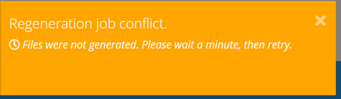
- Improved the Regenerate Files process in Payables to better handle situations where another request is already being processed. If the service is temporarily busy, the system will now automatically retry and if the process is still busy provide a clear message that additional time is needed before resubmitting the request. (31425)
- Renamed the ‘Adj Date’ field to ‘Adjustment Date’ on the Update Payment Adjustment screen. (32395)
- Resolved an issue where Alphanumeric Payment Center IDs entered as adjustments where alpha characters did not match the same case would be partially recognized during the process but not properly tagged or inserted into the database. (35237)
- Removed the “Previous” buttons from Step 4 and Step 5 of the process that only appeared when resuming a batch. (32489)
Invoice Manager
- Fixed issues that occurred on an export of the Invoice Manager grid data where the Invoice Date was shifted by one day, where the Total Paid and Admin Fee Count values were showing as blank instead of 0.00 and 0 respectively, and where the Batch Name field was not populated. (30129)
Support Tools Tab
Ticket Tracker
- Fixed an issue where the Claim Info tab was not displaying all transactions with the same Claim ID as the transaction used to create the ticket. (34856)
- Fixed an Issue where related Claims from a previously opened Ticket are shown on a new ticket when using the green back arrow to return to the ticket list. (35821)
- Fixed an issue where newly created tickets could intermittently fail to save the ticket creator as the Assigned User. (35546)
- Fixed an issue where tickets created with the default Medium priority could incorrectly display a priority of None on the Ticket Tracker Search Results grid, Ticket Detail screen, and My Team View -> Team Tickets grid. This issue occurred when the ticket was saved using the default Medium priority without changing the value. (35548)
- Fixed an issue where the Edit Tag and Edit Reason pop-up windows were not displaying the currently assigned Tag or Reason in the Enter Name field. (35782)
- Updated the Resolved Reason add/edit pop-up in Ticket Tracker to change the header to "Ticket Resolved Reason" and the action button text to "Save Resolved Reason". Confirmation messages were also updated to properly reference Resolved Reason. (35854)
APIs
AccumulatorImport
- Fixed an issue where accumulator records submitted through the Accumulator Import API were setting the InsertDateTime to UTC instead of Eastern time. (28821)
HotFixes
The HotFixes section includes both Enhancement and Bug related information applied to an earlier version after the publication of their Release Notes.
Claim Tab
Adjudication
- 1.18.5.2 – Resolved an issue where a 92 reject could occur when calculating the SFS if the transaction used the Calculate SFS on Rejections option and the SFS used a MAC List for matching when the transaction had already been rejected by an earlier Process Rule. (35344)
- 1.18.6.2 – Improved error handling of the Eligibility / Patient Pay service to reject for an 85 Claim Not Processed with additional text of API Service Rejected Transaction if the response from the client included a Rejected Status and no Reject code, or if the client does not respond at all. (35786 / 36147)
Member Tab
Create Cardholder
- 1.18.6.2 - Fixed a regression issue where the Ignore Updates From Imports option was automatically set for both Test and Non-Test members. The option is now correctly applied only to Test members as intended (35901)
Pharmacy Tab
Payment Center Manager
- 1.18.6.2 – Fixed an issue on the Payment Center Details -> Associated Pharmacies section where pharmacies linked to a Payment Center were not loading, causing the pharmacy list to appear empty despite existing associations. (36377)
Rules & Calculators Tab
Bill Cost Calculator
- 1.18.6.2 - Resolved an issue where comparisons within an attached cost calculator between SFS, U&C, GAD, and Submitted Ingredient Cost were not correctly including the Dispense Fee when applicable, causing inaccurate price selection during evaluation. (36149)
Process Rules
- 1.18.5.2 - Fixed an issue in the Process Rules Bulk Update functionality where updates made to multiple selected lines were not saved. (35364)
Files and Jobs Tab
Job Manager
- 1.18.6.2 – Eligibility Import - Fixed an issue where an error occurred during the load when trying to capture the change related information to audit tables. (35317)
- 1.18.5.2 – Formulary Import - Resolved a timeout issue caused by excessive logging of items unrelated to the import process. (35917)
- 1.18.5.2 – MAC Import – Increased a timeout to prevent occurrences of the MAC File reporting a success where no data was updated. (35771)
- 1.18.6.2 – MAC Import – Improved performance of new auditing to prevent failures during the loading of larger files. (35808)
- 1.18.5.2 – Workers Comp Eligibility - Fixed an issue that caused the import to fail when the optional Claim Status field was not populated. The import process now properly handles blank or NULL Claim Status values, allowing valid files to process successfully. Please note that while allowed, Null values in this field are not recommended. (35638)
Reporting Tab
Report Manager
- 1.18.6.2 – Fixed an issue where triggering the job via Run Now would use the report parameters from the last time the backend service was started, causing the report to run with out-of-date settings. (35180)