RxLogic PBM Application Update
|
Update Type |
Minor |
|
Update Description |
This version update includes stabilization and performance items and various bug fixes. Added Features:
|
|
Existing Feature Behavior Changes |
|
|
Version Number |
1.18.8.2 |
|
Production Release Date |
10/6/2026 |
|
UAT Release Date |
9/23/2026 |
New Features
The New Features section of the Release Notes is dedicated to work items that are new functionality that were not in previous versions of the application. If you have additional questions on any of the new functionalities, please reach out to your RxLogic CSM.
Claim Tab
Adjudication
New AmountOfCopay Field on Transactions Table (35707 / 37733) – In the NCPDP Claim Standard Response, the Amount Of Copay field (518-FI) is used to indicate the portion of the Patient Pay directly related to the Patient’s Copay. RxLogic returns this value in the NCPDP Response but was not capturing it in a database field on the Transactions table. A new AmountOfCopay field was added to the Transactions table to capture this value.
Note: Originally RxLogic planned to use the existing Copay field for this purpose, but as it has been used interchangeably with Patient Pay for the life of the system the decision was made to utilize a brand-new field instead.
Paid Claim Lookup
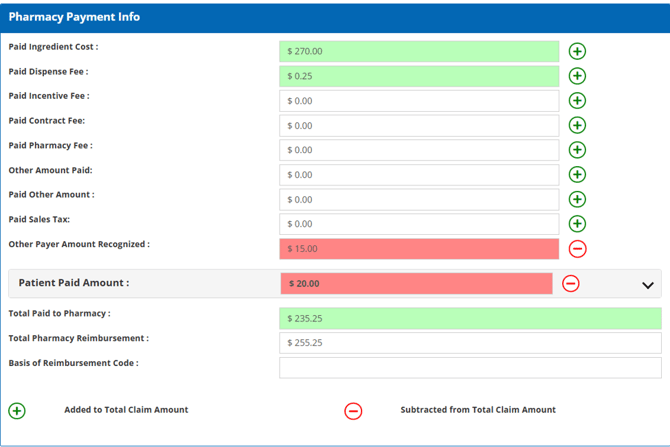
Addition of Other Payer Amount Recognized Field (35768) – The Other Payer Amount Recognized field was added to the New version of the Response Details tab, replacing the Paid COB Amt field. This field shows the Other Payer Amount Recognized for the transaction displaying in red when the value is non zero.
Transaction Details
Claim Adjustment – Support for Other Payer Amount Recognized (35765) – The Transaction Details -> Claim Adjustment screen was enhanced to support Other Payer Amount Recognized (OPAR) values during claim adjustments. A new fields for “Plus Other Payer Amount Recognized” was added to Box B, and a related “Minus Other Payer Amount Recognized” field added to Box C. The OPAR value is loaded from the original transaction and is included in the Box B Total and Box C Subtotal calculations.
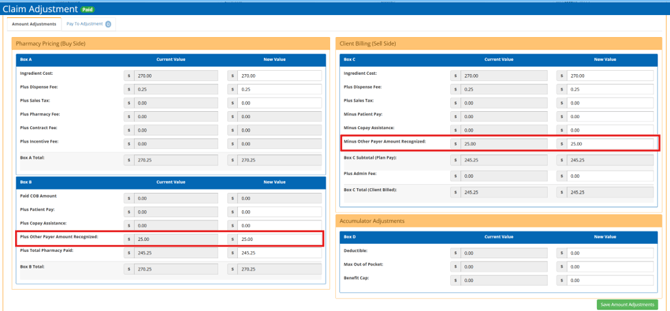
The new value in each of the new fields is linked, and a change to one directly changes the value in the other. On Save of the transaction, the updated Other Payer Amount Recognized is saved to the transaction.
Claim Adjustment – Processing Fee Related Updates (36469) – The Claim Adjustment screen field for Plus Admin Fee in Box C was updated to now display the Sell Processing Fee instead of the Processing Fee values. In addition to being used to set the value on the adjusted Transaction, The Sell Processing Fee is added to the Plan Pay on this screen to set the Client Billed value.
While not visible on the screen, values for the ProcessingFee (a deprecated field) and BuyProcessing are kept as is from the original Transaction.
Pharmacy Tab
Network Manager
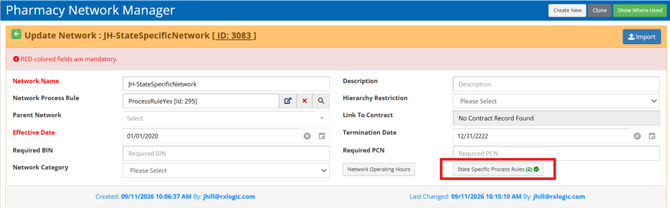
State Specific Network Process Rules (36268 / 36422 / 37302 / 37821) – The ability to specify Process Rules based on the Pharmacy’s physical location was added. Accessed via the State Specific Process Rules button, a specific Process Rule can be associated with a State for a date range. This process rule overrides the Network Process Rule on the Network itself if one exists for a State. Transactions for Pharmacies without their State on the list will continue to use the Network Process Rule as before.
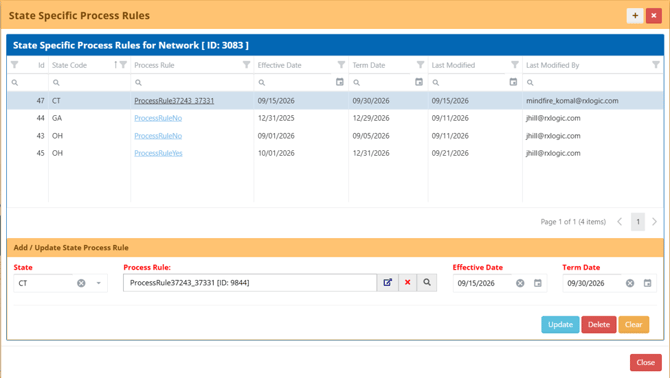
When a State specific rule is used in place of the Network Process Rule, a rule tracker event is output indicating the override occurred.

Plan Design Tab
Plan Manager
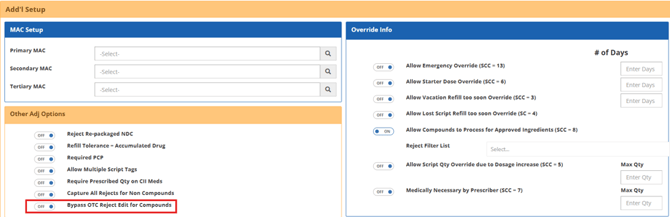
Compound Logic - Bypass OTC Reject Edit for Compounds with an RX Ingredient (36906) – A new plan level option, “Bypass OTC Reject Edit for Compounds,” was added in the Other Adj Options section on the Add’l Setup tab. When enabled, this option allows OTC compound claims to bypass the Reject 70 – PRODUCT/SERVICE NOT COVERED – PLAN/BENEFIT EXCLUSION (OTC DRUGS NOT COVERED) if at least one submitted ingredient is an Rx drug. All other plan edits continue to apply normally.
Fill Rules
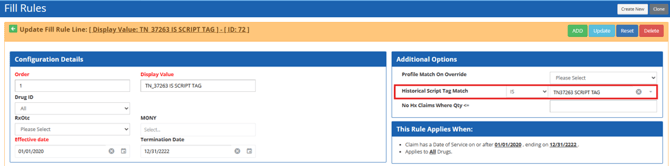
Script Tag Filtering Enhancements (37263 / 37374) – The Fill Rule screen now includes a new IS / IS NOT filter for the Historical Script Tag Match setting, giving control over how member claim history is evaluated.
-
IS (default behavior) - Selecting IS limits history retrieval to only those transactions that contain the specified script tag. This aligns with current functionality, with an important correction to the handling null script tags.
-
IS NOT - Selecting IS NOT excludes any transactions that contain the specified script tag from the member’s claim history.
Transactions with multiple script tags are considered a match if any tag matches the specified value. The Historical Script Tag match filter is optional and does not need to be set to create or save a Fill Rule.
Rules & Calculators Tab
COB Rule
Compare OPPRA Pricing Against Calculated Pricing (31953) – A new Compare OPPRA to Cost Calculator Result option was added to the COB Rule. This option is only applicable to the Other Payer Patient Responsibility Amount (OPPRA) Payment Formula options of OPPRAOnly as this behavior occurs automatically as a part of the newer LowerOfOPAPVsOPPRA option.
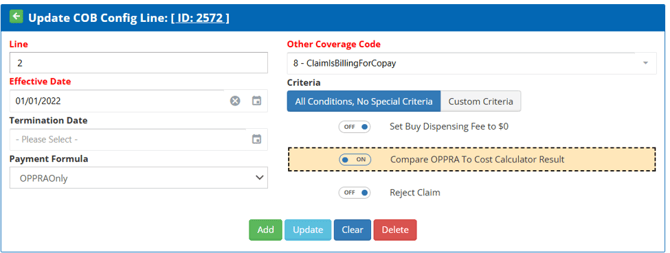
When this option is set, the result of the Cost Calculator is compared to the submitted OPPRA amount. If the OPPRA amount meets or exceeds the Cost Calculator value, the Cost Calculator result is used instead. A new rule tracker event is displayed in the event that the Cost Calculator pricing is lower than the OPPRA amount.

Copay Rules
New Copay Calculation Method (36806) – A new option of Greater Of (((Total Cost – Max Dollar) * Percent) + Min Dollar) or $0 was added. This calculation uses the following logic:
-
Total Cost - Max Dollar = Sum1
-
Sum1 * Percent = Sum2
-
Sum2 + Min Dollar Copay = Copay1
-
If Copay1 < 0, Final Copay is
-
Descriptive text was added with this Copay option to describe the calculation that is performed.
Process Rules
External Adjudication Enhancement for Send Result Only (35634 / 35659 / 35743 / 37725 / 38338) – RxLogic offers Clients the ability to lease a Pharmacy Network with pricing provided to the Client at time of adjudication via the External Adjudication functions. To further enhance this functionality allowing the Client to have their own local pricing for specific pharmacies or NDCs while still allowing their Network Partner to pay pharmacies on their behalf, a new External Adjudication – Send Result Only option was added.
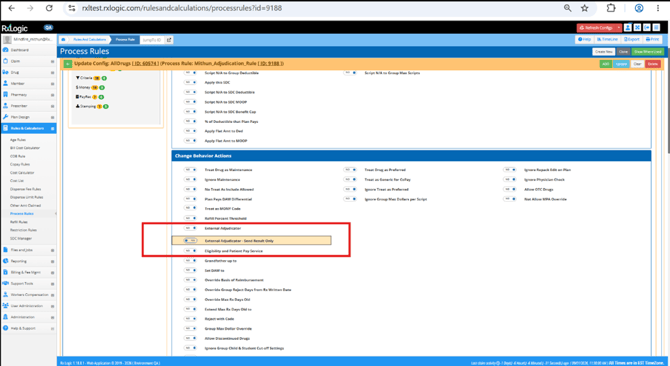
When enabled, all pricing is calculated based on setup within the local environment with the final locally calculated buy-side pricing transmitted to the external adjudicator for claim capture. This provides the necessary record for payment without the need for any additional effort at the time of billing. The External Adjudicator is noted with (Result Sent Only) when viewing the transaction in the Local environment.
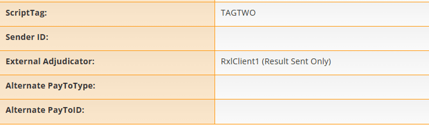
The External Adjudicator – Send Result Only option does not need to be on the same configuration as the External Adjudicator itself, allowing this option to be triggered without having to put it directly on the External Adjudicator process rule itself.
In the destination environment, the transaction will be tagged as Imported, differentiating it from the online processed transactions. In the source system, the transaction is still tagged as Exempt from Payables, has a new ExternalAdjudicatorSendResultOnly transactions table value set to true, and the rule tracker shows the information below regarding the submission to the External partner.

New Actions for Coverage Type Checks (37243 / 37331) – New options for “Apply Only If Coverage Type In” and “Apply Only If Coverage Type Not In” were added to the Criteria section of actions. Both options allow for the selection of one or many Coverage Types. During adjudication, the Date of Service of the transaction determines what the member’s coverage type is. If the Coverage Type In option is being used, the member’s coverage type must be in the list of Coverage types or the rule is skipped. If the Coverage Type Not In option is used, the member’s coverage type cannot be one of the listed coverage types or the rule is skipped.

Restriction Rules
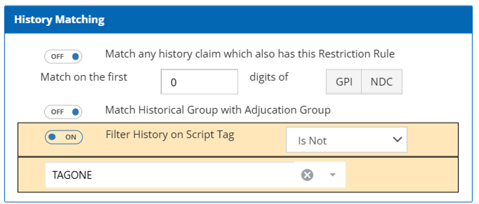
Script Tag Related Filters (37260 / 37368) – A new Filter History on Script Tag option was added. This option allows for the definition of a Script Tag as a filter against the Patient’s transaction history with options of Is or Is Not. If set to Is, only transactions within the history that match the script tag are included in the historical total. If Is Not, only transactions without the Script Tag are counted.
This Script Tag is only used for the filtering of previously processed transactions for historical totals and does not perform any filtering based on the script tag of the currently processing transaction.
Files and Jobs Tab
Job Manager
Claim Adjustment Import – Updates for Other Payer Amount Recognized and Processing Fees (36466 / 36541) – Updates were made to the Claim Adjustment Import to allow for better handling of Other Payer Amount Recognized (OPAR) and Processing Fee values. The updates were:
-
Remapping of field 10 ProcessingFee to SellProcessingFee
-
Addition of the OtherPayerAmountRecognized as a new field 16
-
Addition of BuyProcessingFee as a new field 17
The pre-existing 15 column layout is still supported, and Clients only need to update their formats if they wish to take advantage of the new fields. Providing a file in the 15 column layout will treat the OtherPayerAmountRecognized and BuyProcessingFee as pass through values from the original transaction.
Please note that the generated detail file (-det) will be in the 17 column layout regardless of the number of columns on the import file.
Claim Submission V2 - Reporting Enhancements (36459 / 37124) – Version 2 of the Claim Submission job now generates output files to provide better visibility into submission results. A new Acknowledgement file provides summary level counts about the job itself such as a count of Paid and Rejected transactions. Additionally, a new Result file provides basic transaction level information such as the Authnum assigned, whether it Paid, related reject codes, and basic pricing information.
Both outputs are placed in the Logs folder within the original file load location. For more details on the output files, please refer to the file specification.
Job Run Logs
Claim Reprocessing – Progress Updates in UI (20283) – The Claim Reprocessing job now includes progress tracking, providing visibility into the overall job execution process. This detail is visible on the Job Run Log for the process including the 4 stages of the load (Staging, Validation, Resubmission, and Writing Output Logs). The name of the file being processed is displayed in parentheses to the right of the stage.
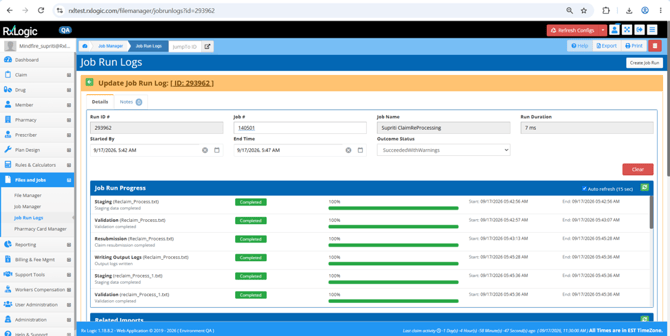
The screen is set to check for updates every 15 seconds. An example of a stage when it is actively processing is below.

Billing & Fee Mgmt Tab
Receivables Manager
Addition of ETID File Acknowledgement Screen (28842 / 32283) – A new Import Log tab was added to both Receivables and Payables to capture and track generated billing files and if the file had been imported into the Payrec system. The new grid displays key file details including Billing Cycle ID, Date Created, Billing Cycle File Name, and Auto Push to PayRec status, with filtering available for each column.
The general use case for this screen is for clients that utilize the automatic import into PayRec for many files, allowing for a quick reconciliation that all generated files successfully imported. Files that do not appear in PayRec appear with a red background to easily identify any that are missing. 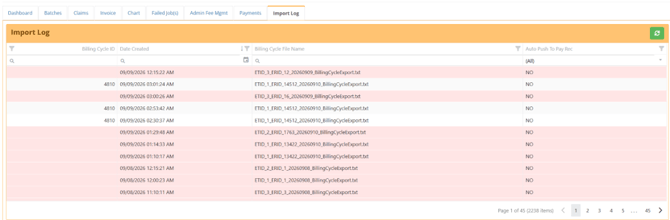
APIs
ClaimAdjustment
API Support for Other Payer Amount Recognized (36461) – The Claim Adjustment Client APIs were enhanced to support Other Payer Amount Recognized (OPAR) values. The ClaimDetailsByIdentifier endpoint now returns the OtherPayerAmountRecognized value from the transaction, and the ClaimAdjustment endpoint accepts OtherPayerAmountRecognized as part of the adjustment request.
OPAR is included in the adjustment calculation logic used to derive the new transaction's Plan Pay amount, making the calculation Sell Ingredient Cost + Sell Dispensing Fee + Sell Sales Tax – Patient Pay – Copay Assistance Adjustment Amount – Other Payer Amount Recognized = Plan Pay.
Processing Fee Related Updates (36473) – Improved support for Processing Fee fields was added to the API. The ClaimDetailsByIdentifier endpoint now returns separate BuyProcessingFee and SellProcessingFee values, removing the previously returned ProcessingFee field.
The ClaimAdjustment endpoint now accepts BuyProcessingFee and SellProcessingFee values, which are stored on the adjusted transaction. If ProcessingFee is provided, it is ignored.
MemberEnrollment
Updates for Relationship Code (36501) – An update was made to the MemberEnrollment Client API to ensure consistent validation of relationship codes for both Partial and Full Eligibility types. The API now accepts only the following valid relationship codes: 0–8, P, S, and D. Any other value will generate a record error stating: “Relationship Code Invalid for Member 01! Valid Values are 'P', 'S', 'D', '0', '1', '2', '3', '4', '5', '6', '7', and '8'. Eligibility will be skipped.”
PharmacyRadiusPricing
Addition of Optional BIN and PCN Field (37169) - The PharmacyRadiusPricing and MemberPharmacyRadiusPricing Client API endpoints were enhanced to support optional BIN and PCN request fields. This enhancement enables callers to override the default BIN and PCN values used during pricing transactions, allowing Process Rules that rely on BIN and PCN criteria to be evaluated correctly. If these values are omitted, the defaults of 000000 for both are submitted.
Database
New Fields
The following new fields were added as part of this release:
|
Database |
Table |
Field |
Data Type |
Length |
|
Enrollment |
Network_ProcessRules |
Id |
int |
|
|
Enrollment |
Network_ProcessRules |
ProcessRuleId |
int |
|
|
Enrollment |
Network_ProcessRules |
NetworkId |
int |
|
|
Enrollment |
Network_ProcessRules |
StateCode |
VARCHAR |
2 |
|
Enrollment |
Network_ProcessRules |
StartDateTime |
DATETIMEOFFSET |
7 |
|
Enrollment |
Network_ProcessRules |
EndDateTime |
DATETIMEOFFSET |
7 |
|
Enrollment |
Network_ProcessRules |
ChangedBy |
VARCHAR |
255 |
|
Enrollment |
Network_ProcessRules |
Changed |
DATETIMEOFFSET |
7 |
|
Enrollment |
Network_ProcessRules |
CreatedBy |
VARCHAR |
255 |
|
Enrollment |
Network_ProcessRules |
Created |
DATETIMEOFFSET |
7 |
|
Enrollment |
LookBackRuleLines |
ScriptTagMatchType |
TinyInt |
|
|
Enrollment |
LookBackRuleLines |
ScriptTagToMatch |
nvarchar |
255 |
|
Enrollment |
FillRuleLines |
ScriptTagMatchType |
TinyInt |
|
|
Enrollment |
JobRunStages |
Id |
INT |
|
|
Enrollment |
JobRunStages |
JobRunId |
INT |
|
|
Enrollment |
JobRunStages |
StageName |
NVARCHAR |
128 |
|
Enrollment |
JobRunStages |
StageOrder |
TINYINT |
|
|
Enrollment |
JobRunStages |
Status |
TINYINT |
|
|
Enrollment |
JobRunStages |
PercentComplete |
TINYINT |
|
|
Enrollment |
JobRunStages |
Started |
DATETIMEOFFSET |
7 |
|
Enrollment |
JobRunStages |
Ended |
DATETIMEOFFSET |
7 |
|
Enrollment |
JobRunStages |
Message |
NVARCHAR |
MAX |
|
Enrollment |
JobRunStages |
FileName |
NVARCHAR |
255 |
|
Enrollment |
ProcessRuleConfigs |
ApplyOnlyIfCoverageTypeIn |
VARCHAR |
50 |
|
Enrollment |
ProcessRuleConfigs |
ApplyOnlyIfCoverageTypeNotIn |
VARCHAR |
50 |
|
Enrollment |
COBRuleConfigs |
CompareOPPRAToCostCalc |
BIT |
|
|
Staging |
ClaimAdjustStaging |
SellProcessingFee (Renamed existing ProcessingFee) |
DECIMAL |
(14, 4) |
|
Staging |
ClaimAdjustStaging |
OtherPayerAmountRecognized |
DECIMAL |
(14, 4) |
|
Staging |
ClaimAdjustStaging |
BuyProcessingFee |
DECIMAL |
(14, 4) |
|
Tx |
Transactions |
AmountOfCopay |
DECIMAL |
(14, 4) |
|
Tx |
Transactions |
ExternalAdjudicatorSendResultOnly |
BIT |
Bug Fixes and Minor Enhancements
The Bug Fixes and Minor Enhancements section of the Release Notes documentation is dedicated to existing functionality of the application that had an issue or received a minor update or improvement.
Claim Tab
Adjudication
-
Fixed and issue where if Capture All Rejects on Non-Compounds is enabled, Reject code-related messages were not displayed first with lower priority informational messages occurring first. (36385)
-
Fixed an issue where reject code related messaging for DUR rejections was omitted when Capture All Rejects on Non-Compounds was enabled. (36506)
-
Fixed an issue where accumulator contributions from terminated dependents were not always included when calculating family accumulator totals after family members moved to a new group under the same plan. (36559)
-
Corrected the Basis of Reimbursement to 14 when a transaction’s pharmacy reimbursement is based off the Other Payer Patient Responsibility Amount (OPPRA). (35710)
-
Added support for OCC 2 (OPAP) pricing for clients that relied on an External Adjudicator in the External Pricing Only configuration. Please note that the External Adjudicator destination must be set up to properly handle OCC 2 transactions in their COB rules. (36557)
-
Improved caching time for the Config Only refresh to reduce time related to caching of DUR settings. (37265)
Drug Tab
Import Manager
-
Formulary Import – Improved Step 2 preview for Apply Adds and Changes to hide extra rows that were used by the load process to determine how to update existing records. Only records on the file are now shown. (34074)
Pharmacy Tab
Pharmacy Manager
-
Fixed a display issue on the Pharmacy Network Association tab where duplicate records for a Network were shown if the Network Entity appeared multiple times within the same network, such as with one record as terminated, and another record active. (34106)
Plan Design Tab
DUR Manager
-
Fixed an issue where cloning kept the Same IDS for each tab as the source. Because the cloned rule shared child IDs with the source rule, updates made to one rule could unintentionally impact other cloned rules that referenced the same child records. (37267)
Rules & Calculators Tab
COB Rule
-
Cleaned up Rule Tracker output to include additional IDs when a COB rule is used, and suppressed output of OCC doesn’t match outputs. (35671)
Process Rules
-
Added a new Dynamic Condition for the Version/Release Number [102-A2] field. This allows for rules to be directed to D0 or F6 versions specifically. (34759)
Restriction Rules
-
Improved the default Priority setting to default to 1 or next available number when creating a new rule. This will prevent instances of false showing in this field. (32247)
Files and Jobs Tab
Job Manager
-
All Jobs - Fixed an issue where the "Original File Location" file selector displayed file timestamps in a different time zone than the rest of the application. (36088)
-
Claim Import - Resolved an issue where the Fill Number was not being included in duplicate checking when netting logic was applied. The Fill Number is now fully validated as part of duplicate detection to ensure accurate and consistent import behavior. (36278 / 37832)
-
Claim Import – Improved the import to now automatically stamp the Pharmacy State on the Transaction record based on the provided Pharmacy. (36802)
-
Eligibility Import – Fixed an issue with the Partial file type where providing multiple records with the same effective date for the same member that also shared an effective date with a record on system would result in loading overlapping coverage periods instead of erroring the records out. (35745 / 37744)
-
Eligibility Import - Updated FULL file type file validation to detect enrollment conflicts when a member (CHID + Person Code) has a coverage period start date that matches the termination date of another record for the same member within the file. These overlaps will now generate an enrollment conflict error instead of being accepted. (36846)
-
GPI Usage Report – Fixed minor issues that occurred with matching MPAs where missing Created dates and End Dates would cause a problem with generating the report. (30103)
-
UDF Import – Fixed an issue where the Processed folder was placed inside of an unnamed folder instead of directly in the source file location. (37301)
-
UDF Import - Resolved an issue where member records could not be successfully resolved when a CHID was associated with multiple Person Codes, even when the combination of CHID, Person Code, and Group uniquely identified a single member. (37299)
Billing & Fee Mgmt Tab
Payables Manager
-
Updated the Column Header controls on the Adjustment Mgmt tab to be more consistent with other pages within the application. (32399)
Receivables Manager
-
Fixed an issue with displaying output files related to the Batch when processing multiple billing cycle IDs with different Billing Cycle Dates. This resolves issues on both Step 6 of the wizard and when accessing the files from the Batch screen. (37262)
Support Tools Tab
Ticket Tracker
-
Limited the Enter Name value to 64 characters for the dropdown values for Title, Tags, Call Reasons, Note Types, and Ticket Resolved Reasons. As a part of this change, inconsistent save confirmation messages were updated. (35781)
-
Increased size of entry field for the Add Note Type dialog box. (35784)
-
Added hover over tool tips to Title, Tag, Reason, Note Type, Resolved Reason and their list entry popup to show the full entered value. (36282)
Help & Support
Release History
-
Added Release Notes for the 1.18.7 Release. (37116)
Medi-Span Updates
-
Added the Fall 2026 Medispan GPI updates information. (37510)
APIs
PharmacyRadiusPricing
-
Resolved an issue where the pricing transaction would fail if the provided Cardholder ID did not exist and the provided group was set as Auto Enroll. (36091)
TestClaimSubmit
-
Fixed error handling for missing Rx Numbers by adding an Errors key with a message of “Rx Number is Required”. (37271)
HotFixes
The HotFixes section includes both Enhancement and Bug related information applied to an earlier version after the publication of their Release Notes.
Claim Tab
Adjudication
-
1.18.7.2 – Fixed a regression issue in the Patient Lookup that could result in a patient rejecting for N1: No Patient Match Found and 65: Patient Is Not Covered when a group used the Carrier as the Submitted Group and the value provided was not a valid Carrier Code. (37180)
-
1.18.7.2 – Fixed a regression issue where the OriginalRejectCode field was always populating with a reject code instead of only populating when the reject was overridden by a WrapProcessor Process Rule that sent the transaction to an External Adjudicator. (37547)
Drug Tab
Formulary Manager
-
1.18.7.2 - Resolved an issue where drug termination dates were not displayed correctly within the grid. (37739)
Member Tab
Member Search
-
1.18.7.2 – Member Merge - Improved logging on Notes creation portion of the merge and added from and to member IDs to the logging on the job run ID. (36561)
Files and Jobs Tab
Pharmacy Card Manager
-
1.18.6.2 - Fixed an issue that would cause card generation jobs to fail for new members with future effective dates, preventing member ID cards from being created. (36611)
Support Tools Tab
Ticket Tracker
-
1.18.7.2 - Expanded the Title Field Length to keep sizing consistent with pre 1.18.7.2 implementation and corrected an issue where the cursor was no longer starting in the Title field on ticket creation. (36581)