RxLogic PBM Application Update
|
Update Type |
Minor |
|
Update Description |
This version update includes stabilization and performance items and various bug fixes. Added Features:
|
|
Version Number |
1.18.9.2 |
|
Production Release Date |
11/3/2026 |
|
UAT Release Date |
10/21/2026 |
New Features
The New Features section of the Release Notes is dedicated to work items that are new functionality that were not in previous versions of the application. If you have additional questions on any of the new functionalities, please reach out to your RxLogic CSM.
Site Wide
Phase 1 Enhancements for Person Code 00 Support (37910 / 37911 / 37913 / 38003 / 38004 / 38616) – RxLogic is developing support for the usage of a 00 Person Code for Primary Members. This update includes a handful of general changes that impact all clients related to the creation of Print Card requests. Changes to a Member that trigger the creation of a Print Card Request for changes to Name and Coverage Type on the Primary are now using Relationship Code of 1 as the identification of the Primary, instead of Person Code 01. These Print Card Requests are generated by the Eligibility Import, and Member Enrollment API. The Print Card Requests for these changes are filtered or output on Print Card files based on the settings for “Print Card for Primary Coverage Type Changes” and “Print Card for Primary Name Changes”.
While many areas of the system are updated to include basic support for Person Code 00, it is recommended that only Non-Production live clients utilize the functionality described below. Future enhancements for more specific Group options, Receivables Fee support, Print Card support and other general functions that rely on a Person Code of 01 to identify the primary will be transitioned to look at Relationship Code of 1 in a future release.
Enabling the 00 Person Code is done in the Global Defaults section of the application. Setting the “Eligibility – Allow 00 Person Code” to True will allow the Person Codes in areas across the application. Leaving this option undefined, or false will result in no change to Person Code support.
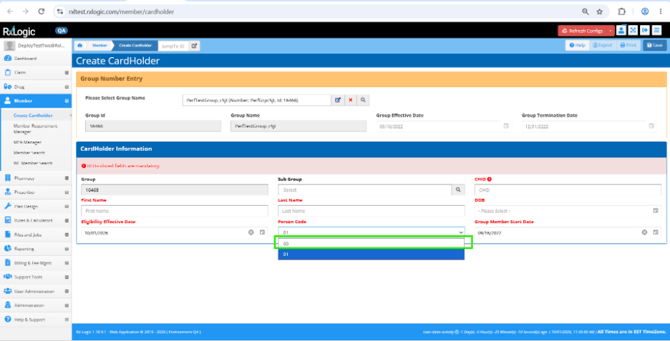
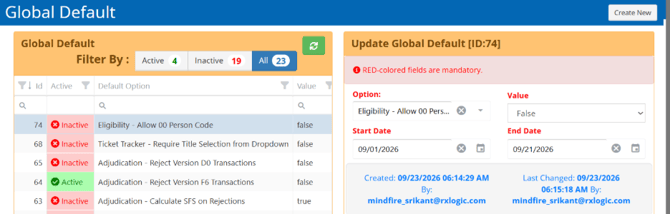 When this option is enabled, the Create Cardholder screen dropdown includes an option for the 00 Person Code.
 When the Global Default option is enabled, the member page allows for selection of a 00 or 01 Person Codes. Members with person codes 02 and above still use a free text box to change the Person Code as needed.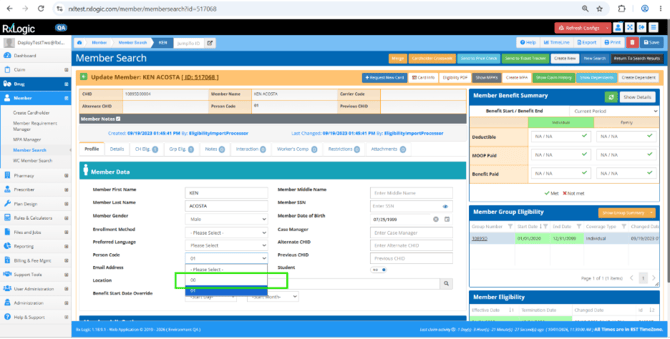
The Standard Eligibility import now allows files with 00 Person Codes if the Global Option is set to True. When this option is off, the entire file is failed without loading any data if a 00 Person Code is found in the file unless the job uses the Auto Increment Person Code option. Changes apply to both the Full and Partial file types.
The Member Enrollment API also respects the settings of the Global Default option. When True, 00 person codes are allowed. When false or not defined, an error of “Person Code Invalid for Member 00! Eligibility will be skipped” is still returned.
New Specialty Tag and Drug Types for Copay Rules, Cost Calculator Rules, and Bill Cost Calculator Rules (37792 / 37903 / 38320 / 38322 / 38394 / 38395 / 38397 / 38398) To allow for easier benefit builds related to Specialty products, a series of enhancements were made to the RxLogic Platform. Starting with Process Rules, three new options related to the tagging of a drug as Specialty were added. The new options are:
- Change Behavior -> Treat Drug as Specialty, which sets an indicator for the drug being Specialty
- Change Behavior -> Ignore Treat as Specialty, which is used to remove the Specialty indicator after it has been set for a drug
- Criteria -> Apply Only if Drug is Specialty, which acts as a filter for the Process Rule and will disqualify the line if the drug is not set as specialty
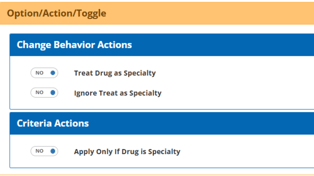 When a drug is set as Specialty, a new IsSpeciality field in the TransactionItems table is set to 1.
In addition to the stamping of this information in the database, the IsSpecialty setting is now used by the Copay Rules, Cost Calculator Rules, and Bill Cost Calculator Rules. Each now includes an optional Specialty, Specialty Preferred, and Specialty Maintenance tabs. 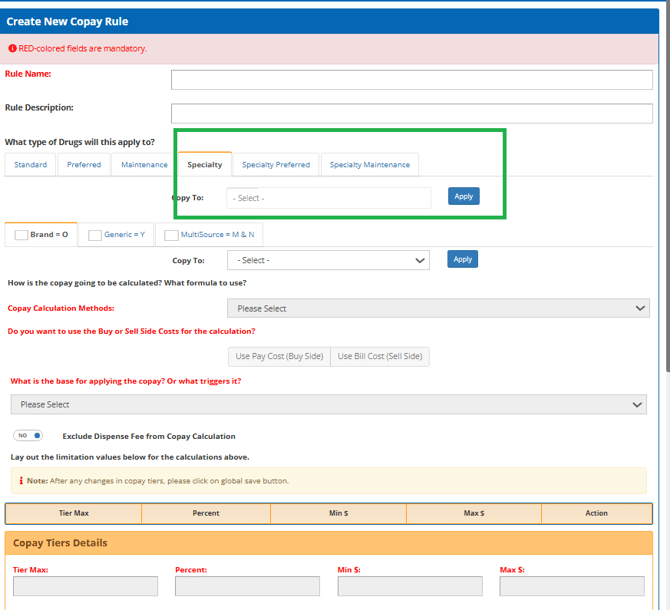
The use of all tabs other than Standard are optional for these edits and are only needed if specific variance based on these designations need to be built into the rule. When configured, the most specific Drug Type designation that qualifies is used. The priority order from highest to lowest is:
- Specialty Preferred
- Specialty Maintenance
- Specialty
- Preferred
- Maintenance
- Standard
The Copy To option was enhanced to allow for complete control over where the settings should be copied to. 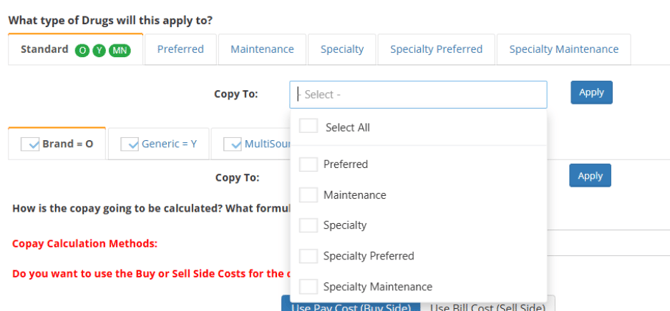
Claim Tab
Transaction Details
Display Process Rule ID and Hyperlink Enhancements in Rule Tracker (37812) – The Rule Tracker output for Process Rules was updated to now include the ID of the Process Rule in parenthesis after the Process Rule name. The “is rejected” output line was also updated to now include a hyperlink and pop-up information, as well as including the ID for the Process Rule as well.
This change was also made to the Claim Processing screen results Rule Tracker.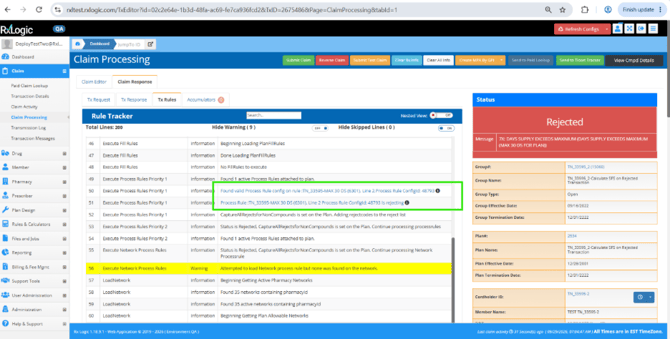 Pharmacy Tab
Network Manager
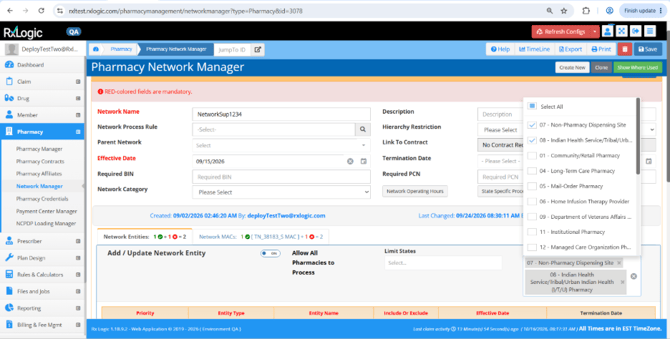
All Pharmacies Network Filter for Provider Type (38506) – The ability to restrict an Allow All Pharmacies network to only pharmacies with a specific Provider Type was added. Configured via the “Limit Provider Types” option on the Pharmacy Network Manager screen, a list of one or many Provider types can be selected for the Network. The Provider type is based on not just the Primary, Secondary, and Tertiary Provider Types visible on the Pharmacy Manager screen, but all provided Taxonomy information from NCPDP. Limit Provider Type can only be used on Allow All Pharmacies to Process networks but can be combined with the Limit States option.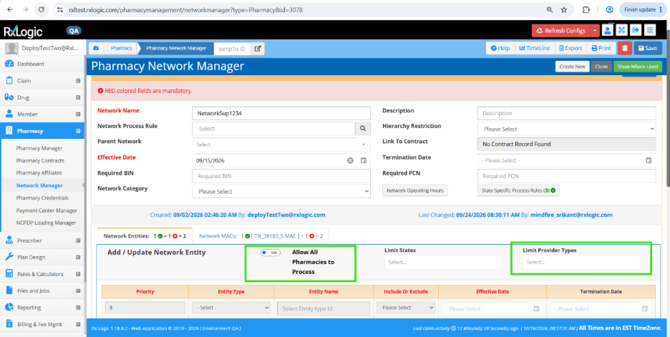 Below shows an example of the multi selection in the Limit Provider Type box.
 Plan Design Tab
Plan Manager
Process Rule Attachment Priority Option to Fire Before Step Therapy and Fill Rules (37755) – A new “Priority0” priority was added when attaching a Process Rule to the plan. Priority0 is now the earliest that a Plan attached Process Rule can be executed during processing, firing before Step Therapy and Fill Rules. All other Process Rule priorities fire after these edits.
Cap Member Cost Share at Plan Share (37060) – A new ‘Cap Member Pay at Plans Liability’ option was added to the Other Adj Options section of the Plan. When this option is set, the Calculated Copay is compared to the amount the Plan will pay. If the amount the Plan Pays is less than the Copay, the two values are flipped. The amount used to determine what the Plan will pay is based off the Buy or Sell pricing option selected on the Copay Rule.
There are a couple of exceptions to when this rule is enforced:
-
If the Deductible has not been met, the portion attributed to the deductible is exempt from this calculation.
-
If there is a DAW Penalty applied to the Member, this will be added after any adjustments made by this rule.
-
If there is a DAW Penalty applied to the Member, this will be added after any adjustments made by this rule.
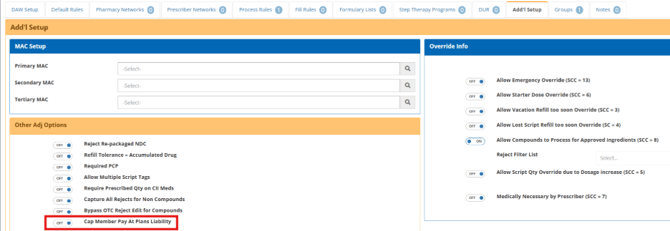
A rule tracker event is output indicating when this flip occurs as a part of the Copay Rule output.
Step Therapy
Improvements to Rule Tracker Output (37907) – The Step Therapy rule tracker output was improved to provide better information for the rules that were used. Now, instead of indicating “Executing Step Therapy Program” for each program attached to the group, a basic count of active Step Therapy programs is output:

When a drug matches a Step Therapy, details for the relevant Step Therapy are output including the specific Line, Tier, Component, and Program of which rule applied, including an indication of whether the Criteria was met or not met. The example below is when the criteria was met:

An example of the criteria not met:

Rules & Calculators Tab
Process Rules
New Matching Criteria for X Number of Claims in Patient Profile (37270 / 37754) – A new option of “Apply Only if Matching Transactions in Patient Profile” was added to the criteria. When enabled, the member must have at least the defined count of transactions in their history within the defined profile length (days) matching the same GPI as the current transaction. The length of the GPI match is set by the dropdown, allowing 2, 4 ,6, 8, 10, 12, and 14. If the criteria is not met, the rule is disqualified.

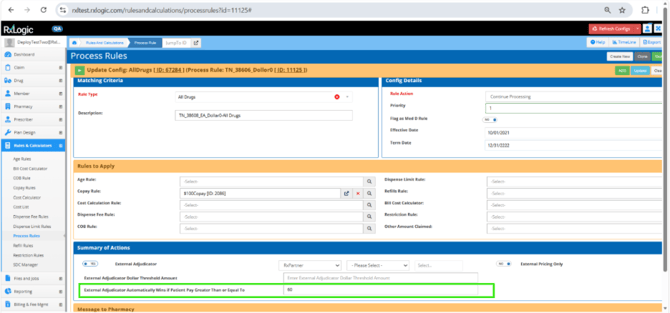
External Adjudication – Automatic Use of External Adjudicator if Patient Pay Exceeds Value (38608 / 38858) – A new option was added to the External Adjudication process of “External Adjudicator Automatically Wins if Patient Pay Greater Than or Equal To”. When set with a value, the external adjudication partner specified will automatically be used if the locally calculated Patient Pay exceeds a certain threshold without comparing the result from the External Partner. When this occurs, a Rule Tracker event is output indicating the reason for the decision.
This option does not apply when the External Pricing Only option is used for the External Adjudicator.
Files and Jobs Tab
Job Manager
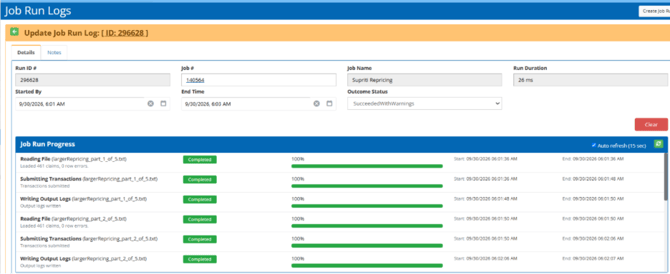
Claim Repricing – Progress Updates in UI (37902) – The Claim Repricing job now includes progress tracking, providing visibility into the overall job execution process. This detail is visible on the Job Run Log for the process including the 3 stages of the load (Reading File, Submitting Transactions, and Writing Output Logs). The name of the file being processed is displayed in parentheses to the right of the stage.
Support Tools Tab
Ticket Tracker
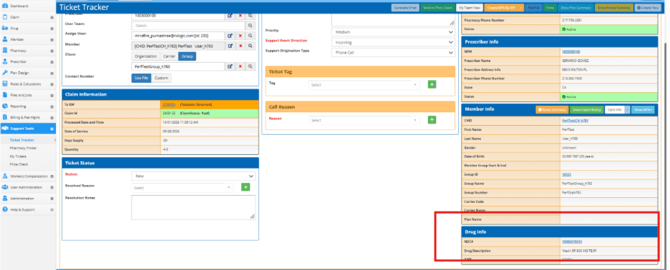
Update Drug Info Field to Display Drug Description (37682) - The Drug Name field in the Ticket Tracker Drug Info section was renamed to Drug Description. The field now displays the drug name, strength, unit of measure, and dosage form when a claim is associated with the ticket. This provides more complete and meaningful drug information for the associated claim.
APIs
GetMemberEnrollment
New Endpoint for Retrieval of Eligibility Data (38576) – A new GetMemberEnrollment endpoint was added to retrieve Member Eligibility data in the same format as the MemberEnrollment endpoint. A Cardholder ID, Person Code, and Group Number are provided as parameters to the endpoint to retrieve the related member’s information. The response can be used as is for the MemberEnrollment endpoint, allowing for an easy way to update the overall request with the necessary new changes prior to re-submission.
On this response, the UpdateType is set to Full, meaning that all coverage periods for the Member will be replaced when sent to the Member Enrollment endpoint. Additionally, the MemberCopayRulesUpdateType is also set to Overwrite and will act as a full replacement of the Copay Rules attached to the member on submission to the MemberEnrollment endpoint.
For additional information, please consult the updated API Documentation.
MemberSummary
Option to Add Group UDFs in Response (37782) – A new request option, IncludeGroupUDFs, was added to the MemberSummary Client API. When IncludeGroupUDFs = true, each Group object in the response includes a GroupUDFs object array.
When the option is not sent, null, empty, or false, the response remains unchanged from the prior version and will not include the GroupUDFs object array.
New Response Fields (within each GroupUDFs object)
- FieldKey
- FieldValue
- EffectiveDate
- TerminationDate
Each member’s Group object will include only the UDFs associated with that specific group.
PricingRequest
Add AmountAttributedToProcessorFee to Response (37684) – The PricingRequest endpoint response now includes a new AmountAttributedToProcessorFee field which returns the processor fee amount attributed to the claim, as provided in the NCPDP response Amount Attributed To Processor Fee field (571-NZ). If the value is not present or is null, the field returns 0.0, consistent with other amount fields in the response.
Database
New Fields
The following new fields were added as part of this release:
|
Database |
Table |
Field |
Data Type |
Length |
|
Enrollment |
ProcessRuleConfigs |
ApplyOnlyIfInPatientProfile |
BIT |
|
|
Enrollment |
ProcessRuleConfigs |
ApplyGPIProfileMatchCount |
TinyInt |
|
|
Enrollment |
ProcessRuleConfigs |
ApplyGPIProfileMatchLength |
TinyInt |
|
|
Enrollment |
ProcessRuleConfigs |
ApplyGPIProfileMatchDaysLength |
SmallInt |
|
Bug Fixes and Minor Enhancements
The Bug Fixes and Minor Enhancements section of the Release Notes documentation is dedicated to existing functionality of the application that had an issue or received a minor update or improvement.
Site Wide
-
Added three new Reject Codes for use within the Reject Code dropdown boxes. No new functionality related to these rejects was added. The codes are:
- 1Z – Clinical Segment Required for Adjudication
- 3S – M/I Prior Authorization Supporting Documentation
- 8X – Collection From Cardholder Not Allowed (37596)
Claim Tab
Adjudication
-
Fixed an issue where a 92 reject would occur if a transaction was rejected because of both a Process Rule and the Group Claim Amount rule with reject code override if an MPA had been applied to just the Process Rule reject. (38142)
-
Resolved an issue where an External Adjudicator - Send Result Only transaction would fail with no response when the external adjudicator’s client API was unavailable. This is now handled and the transaction is rejected with an 85 (Claim Not Processed) response, including the message “External Adjudicator Currently Unavailable.” (38383)
-
Resolved an issue impacting Compound claims on transactions where the External Adjudication -> External Pricing Only option is in use. The OTCs allowed check on the group was performed after the initial Pricing Request was sent, resulting in a higher price being returned than would be used for the final price. The OTC check now runs before pricing, and ingredients that are not covered are identified up front and the price check and copay match the final adjudicated result. (38575)
Member Tab
Member Search
- Fixed a Member Merge issue where the merge would not show as successfully completed if the Source member did not have a Person Code. (26738)
- Fixed a Member Merge issue where the "Set Previous CHID on Destination to Source Member CHID" option was not properly storing the source CHID in the Previous CHID field on the destination member. (37802)
Rules & Calculators Tab
Process Rules
- Renamed the existing “Grandfather Up To” option to “Set Step Therapy Lookback Days To” to clarify the outcome of using the functionality. (37605)
Files and Jobs Tab
Job Manager
-
Claim Reprocessing - Improved performance on the data staging portion of the process. (37831)
-
Eligibility Import – Improved performance of Full file type loads when removing Subgroup coverages not on file. (36435)
Reporting Tab
Billing Report
-
Updated delete behavior to perform an automatic refresh of the reports grid after a deletion. (30787)
Billing & Fee Mgmt Tab
Billing Manager
-
Updated the “No Reports Setup” check to treat Inactive report records the same as having no reports configured. (32487)
Payables Manager
-
Resolved an issue filtering on Billing Cycle Date when performing a search from the Claims tab. (31758)
-
Fixed an issue where the Batch ID field showed the wrong value on the Update Review Invoice Details screen accessed via Edit Invoice button on Step 4. (32338)
-
Improved response time of Transaction assignment to a batch (Step 2 -> Step 3) by removing unused indexes from the database. (31757)
Receivables Manager
-
Fixed an issue where the Batch ID field showed the wrong value on the Update Review Invoice Details screen accessed via Edit Invoice button on Step 4. (32338)
-
Improved response time of Transaction assignment to a batch (Step 2 -> Step 3) by removing unused indexes from the database. (31757)
Invoice Manager
-
Fixed an error that would occur on the Invoice Member Detail tab when jumping to the last page of results. (31863)
Support Tools Tab
Ticket Tracker
-
Fixed an issue where adding a new Title for the dropdown would not appear until after a refresh of the Ticket Tracker page. (37701)
-
Updated the behavior of the Show MPA button to allow it to be clicked on Closed tickets if a member is associated with the ticket. (37722)
-
Updated the Save button behavior to also save the related Notes on the ticket. (37723)
-
Fixed behavior on a Closed ticket for the Notes Summary button to allow for export of the Notes. An issue where the pop up could not be closed was also resolved as a part of this change. (38291)
-
Added Created By and Last Changed By columns to the Support Events grid and renamed the grid to Support Events from Support Event. (36832)
-
Added Created By and Last Changed By columns to the Work Items grid and renamed the grid to Work Items from Related Issue. (36833)
Administration Tab
Global Defaults
-
Added a confirmation popup when performing a delete. (38327)
Help & Support
Release History
-
Added release notes for 1.18.8 to the application. (38366)
HotFixes
The HotFixes section includes both Enhancement and Bug related information applied to an earlier version after the publication of their Release Notes.
Site Wide
-
1.18.8.2 – Added Reject Code D9 – Plan Does Not Request Brand or Reference Product to all dropdowns within the application. No new functionality related to this reject was added. (38587)
Claim Tab
Adjudication
-
1.18.8.2 – Adjusted the External Adjudicator Capture Only flow to still set the transaction as Exempt from Payables on the transaction. The transaction on the External Adjudicator will have this value set as false. (38338)
-
1.18.8.2 – Fixed a regression issue where the description of a reject code was repeated in the response messaging when Capture All Rejects for Non Compounds was enabled for a plan. (38906)
Transaction Messages
-
1.18.8.2 – Fixed a regression issue where general Reject messaging was not being returned without also specifying an Organization, Carrier, or Group. (37914)
Pharmacy Tab
Network Manager
-
1.18.8.2 – Fixed an issue where updating an existing MAC List attached to the network was resulting in an error. (37983)
Files and Jobs Tab
Job Manager
-
1.18.8.2 – Eligibility Import – Fixed an issue where Full file type loads could result in a Subgroup Enrollment Conflict when no Subgroup Code was provided. (38498)